 Tom Hundley
The framework that democratized RAG—and its sharp edges.
In Part 1, we covered the foundational concepts of Retrieval-Augmented Generation: when to use it, how the architecture works, and common mistakes to avoid. Now we build.
LangChain is where most developers start their RAG journey. It has the largest ecosystem, the most tutorials, and integrations with nearly everything. It is also the framework that draws the most criticism for abstraction complexity.
This article will show you how to use LangChain effectively: leveraging its strengths while avoiding the patterns that lead to maintainability nightmares.
LangChain became the dominant RAG framework for several reasons:
The strengths are real:
But the criticisms are also valid:
Use LangChain when:
Consider alternatives when:
By the end of this article, you will have a production-ready RAG system that:
All code is complete and runnable. No "exercise left to the reader" sections.
LangChain has modularized significantly since v0.1.0. Install only what you need:
# Core packages
pip install langchain langchain-core langchain-community

# OpenAI integration (embeddings and LLM)
pip install langchain-openai

# Vector stores (pick what you need)
pip install faiss-cpu  # Local development
pip install pinecone-client  # Production

# Document loaders
pip install pypdf  # PDF support
pip install beautifulsoup4  # Web scraping
pip install unstructured  # Multi-format parsing

# Optional but recommended
pip install python-dotenv  # Environment management
For a requirements.txt:
langchain>=0.3.0
langchain-core>=0.3.0
langchain-community>=0.3.0
langchain-openai>=0.2.0
faiss-cpu>=1.8.0
pypdf>=4.0.0
beautifulsoup4>=4.12.0
python-dotenv>=1.0.0Create a .env file in your project root:
# OpenAI - Required for embeddings and LLM
OPENAI_API_KEY=sk-proj-...

# Pinecone - Only if using Pinecone vector store
PINECONE_API_KEY=...
PINECONE_ENVIRONMENT=us-east-1

# LangSmith - Recommended for observability
LANGCHAIN_TRACING_V2=true
LANGCHAIN_API_KEY=ls-...
LANGCHAIN_PROJECT=my-rag-project
Load environment variables at application startup:
from dotenv import load_dotenv
load_dotenv()

# Verify critical variables are set
import os
assert os.getenv("OPENAI_API_KEY"), "OPENAI_API_KEY not set"For a maintainable RAG application:
rag-project/
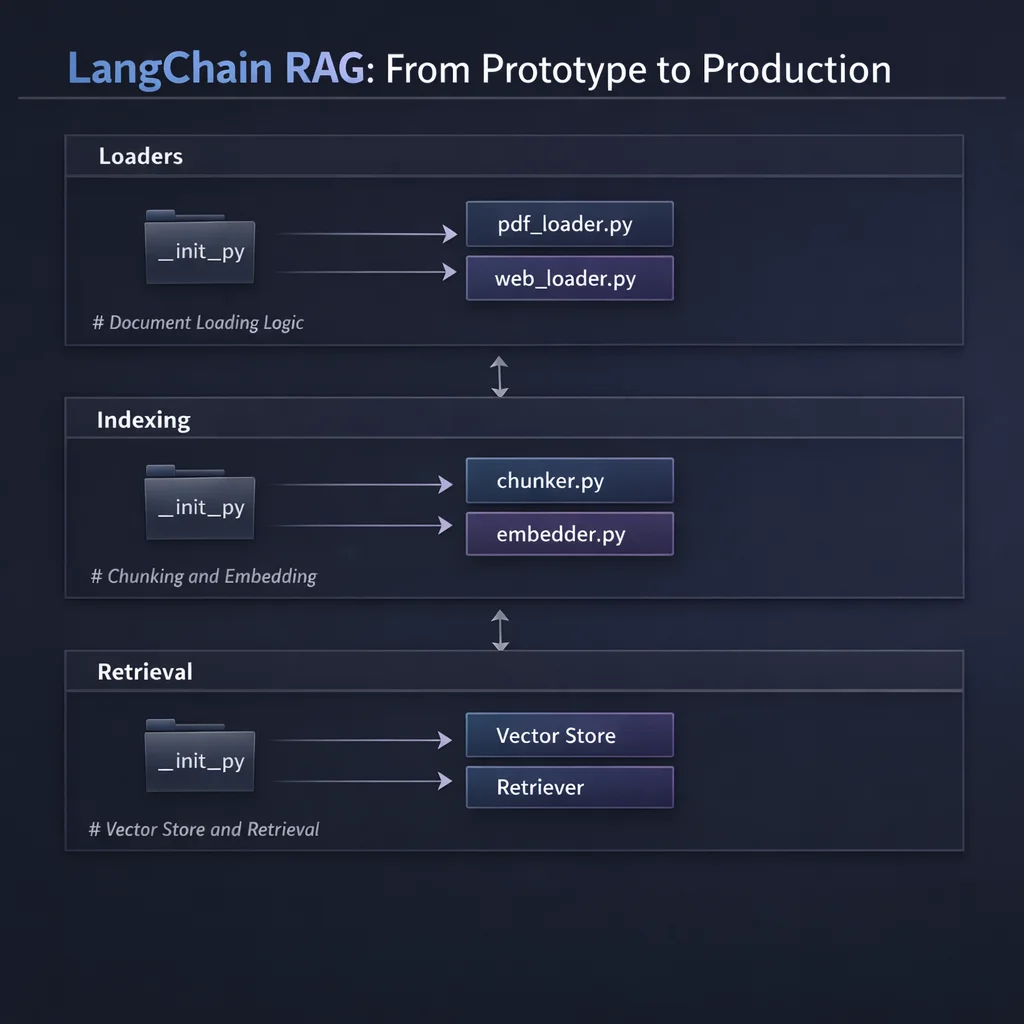LangChain's document loader ecosystem is its greatest strength. Each loader returns a list of Document objects with page_content (the text) and metadata (source information).
from langchain_core.documents import Document

# All loaders produce this structure
doc = Document(
    page_content="This is the actual text content...",
    metadata={
        "source": "/path/to/file.pdf",
        "page": 1,
        "author": "...",
        # Metadata varies by loader
    }
)PDFs are the most common enterprise document format. LangChain offers several PDF loaders with different trade-offs:
from langchain_community.document_loaders import PyPDFLoader

def load_pdf(file_path: str) -> list[Document]:
    """
    Load a PDF file using PyPDFLoader.

    Returns one Document per page, preserving page numbers in metadata.
    This is the recommended default for most PDF use cases.
    """
    loader = PyPDFLoader(file_path)
    documents = loader.load()

    # Documents come with source and page metadata automatically
    for doc in documents:
        print(f"Page {doc.metadata['page']}: {len(doc.page_content)} chars")

    return documents

# Usage
docs = load_pdf("data/documents/company_handbook.pdf")
For PDFs with complex layouts (tables, multi-column), consider UnstructuredPDFLoader:
from langchain_community.document_loaders import UnstructuredPDFLoader

def load_complex_pdf(file_path: str) -> list[Document]:
    """
    Load PDFs with complex layouts using Unstructured.

    Better at preserving table structure and handling multi-column layouts.
    Requires: pip install unstructured pdf2image pdfminer.six
    """
    loader = UnstructuredPDFLoader(
        file_path,
        mode="elements",  # Preserves document structure
        strategy="hi_res"  # Better accuracy, slower
    )
return loader.load()For documentation sites, knowledge bases, and web content:
from langchain_community.document_loaders import WebBaseLoader
import bs4

def load_web_page(url: str) -> list[Document]:
    """
    Load a single web page, extracting main content.

    Uses BeautifulSoup to parse HTML and extract text.
    The SoupStrainer limits parsing to content areas, improving quality.
    """
    loader = WebBaseLoader(
        web_paths=[url],
        bs_kwargs={
            "parse_only": bs4.SoupStrainer(
                # Common content containers - adjust for your target sites
                class_=("post-content", "article-body", "main-content", "content")
            )
        }
    )
    return loader.load()

# For multiple URLs
def load_web_pages(urls: list[str]) -> list[Document]:
    """Load multiple web pages concurrently."""
    loader = WebBaseLoader(
        web_paths=urls,
        bs_kwargs={"parse_only": bs4.SoupStrainer("article")}
    )
    return loader.load()

# Usage
docs = load_web_page("https://docs.example.com/api-reference")For teams using Notion as a knowledge base:
from langchain_community.document_loaders import NotionDBLoader

def load_notion_database(database_id: str, notion_token: str) -> list[Document]:
    """
    Load all pages from a Notion database.

    Requires a Notion integration with access to the database.
    Each page becomes one Document with Notion metadata preserved.
    """
    loader = NotionDBLoader(
        integration_token=notion_token,
        database_id=database_id,
        request_timeout_sec=30
    )
return loader.load()A practical pattern for loading from a directory:
from pathlib import Path
from langchain_community.document_loaders import (
    PyPDFLoader,
    TextLoader,
    UnstructuredMarkdownLoader,
)

def load_directory(directory: str) -> list[Document]:
    """
    Load all supported documents from a directory.

    Handles PDFs, text files, and markdown.
    Extend the LOADER_MAP for additional formats.
    """
    LOADER_MAP = {
        ".pdf": PyPDFLoader,
        ".txt": TextLoader,
        ".md": UnstructuredMarkdownLoader,
    }

    documents = []
    directory_path = Path(directory)

    for file_path in directory_path.rglob("*"):
        if file_path.suffix.lower() in LOADER_MAP:
            loader_class = LOADER_MAP[file_path.suffix.lower()]
            try:
                loader = loader_class(str(file_path))
                docs = loader.load()
                documents.extend(docs)
                print(f"Loaded {len(docs)} documents from {file_path.name}")
            except Exception as e:
                print(f"Failed to load {file_path.name}: {e}")

    return documents

# Usage
all_docs = load_directory("data/documents/")Raw documents are too large for effective retrieval. Chunking splits documents into semantically meaningful units that can be embedded and retrieved independently.
As discussed in Part 1, chunking is one of the most impactful decisions in your RAG pipeline. Get it wrong and even perfect retrieval cannot save you.
This splitter tries to keep semantically related text together by splitting on a hierarchy of separators:
from langchain_text_splitters import RecursiveCharacterTextSplitter

def create_chunks(
    documents: list[Document],
    chunk_size: int = 1000,
    chunk_overlap: int = 200
) -> list[Document]:
    """
    Split documents into chunks using recursive character splitting.

    Parameters:
    - chunk_size: Target size in characters (not tokens). 1000 chars ~= 250 tokens.
    - chunk_overlap: Characters repeated between chunks. Prevents context loss at boundaries.

    The splitter tries these separators in order:
    1. Double newline (paragraph breaks)
    2. Single newline
    3. Space
    4. Empty string (character-level, last resort)

    This preserves paragraph structure when possible.
    """
    text_splitter = RecursiveCharacterTextSplitter(
        chunk_size=chunk_size,
        chunk_overlap=chunk_overlap,
        length_function=len,
        separators=["\n\n", "\n", " ", ""],
        is_separator_regex=False,
    )

    chunks = text_splitter.split_documents(documents)
    print(f"Split {len(documents)} documents into {len(chunks)} chunks")

    return chunks
Choosing chunk_size:
Choosing chunk_overlap:
For documentation and markdown content, preserve header hierarchy:
from langchain_text_splitters import MarkdownHeaderTextSplitter

def chunk_markdown(markdown_text: str) -> list[Document]:
    """
    Split markdown while preserving header context.

    Each chunk includes its header hierarchy in metadata,
    allowing retrieval to understand document structure.
    """
    headers_to_split_on = [
        ("#", "header_1"),
        ("##", "header_2"),
        ("###", "header_3"),
    ]

    splitter = MarkdownHeaderTextSplitter(
        headers_to_split_on=headers_to_split_on,
        strip_headers=False  # Keep headers in content
    )

    chunks = splitter.split_text(markdown_text)

    # Chunks now have metadata like:
    # {"header_1": "Introduction", "header_2": "Getting Started"}
return chunksFor codebases and technical documentation with code blocks:
from langchain_text_splitters import (
    RecursiveCharacterTextSplitter,
    Language
)

def chunk_code(code: str, language: str = "python") -> list[Document]:
    """
    Split code while respecting language structure.

    Keeps functions and classes together when possible.
    Supports: python, js, java, go, rust, and many more.
    """
    splitter = RecursiveCharacterTextSplitter.from_language(
        language=Language.PYTHON if language == "python" else Language.JS,
        chunk_size=2000,
        chunk_overlap=200
    )
return splitter.create_documents([code])Combining these approaches for a robust pipeline:
def chunk_documents(
    documents: list[Document],
    chunk_size: int = 1000,
    chunk_overlap: int = 200
) -> list[Document]:
    """
    Production chunking pipeline with metadata enrichment.

    Adds chunk index and total chunks to metadata for debugging.
    """
    text_splitter = RecursiveCharacterTextSplitter(
        chunk_size=chunk_size,
        chunk_overlap=chunk_overlap,
        separators=["\n\n", "\n", ". ", " ", ""],
        length_function=len,
    )

    all_chunks = []

    for doc in documents:
        # Split this document
        chunks = text_splitter.split_documents([doc])

        # Enrich metadata
        for i, chunk in enumerate(chunks):
            chunk.metadata["chunk_index"] = i
            chunk.metadata["total_chunks"] = len(chunks)
            chunk.metadata["chunk_size"] = len(chunk.page_content)

        all_chunks.extend(chunks)

    return all_chunks
Embeddings convert text into vectors that capture semantic meaning. LangChain provides a unified interface across embedding providers.
OpenAI's text-embedding-3-small is the default choice for most applications:
from langchain_openai import OpenAIEmbeddings

def get_embeddings() -> OpenAIEmbeddings:
    """
    Initialize OpenAI embeddings.

    text-embedding-3-small: 1536 dimensions, $0.02/1M tokens
    text-embedding-3-large: 3072 dimensions, $0.13/1M tokens

    For most RAG applications, 'small' provides sufficient quality
    at lower cost and faster performance.
    """
    return OpenAIEmbeddings(
        model="text-embedding-3-small",
        # Dimensions can be reduced for faster search (trade-off: slight quality loss)
        # dimensions=512  # Uncomment to reduce dimensions
    )

# Usage
embeddings = get_embeddings()

# Embed a single text
vector = embeddings.embed_query("What is the vacation policy?")
print(f"Vector dimension: {len(vector)}")  # 1536

# Embed multiple documents (batched automatically)
vectors = embeddings.embed_documents([
    "First document text",
    "Second document text"
])For cost-sensitive applications or when you need to run locally:
from langchain_community.embeddings import HuggingFaceEmbeddings

def get_local_embeddings() -> HuggingFaceEmbeddings:
    """
    Initialize local HuggingFace embeddings.

    Runs entirely on your machine - no API costs.
    Requires: pip install sentence-transformers

    Common models:
    - all-MiniLM-L6-v2: Fast, 384 dimensions, good quality
    - all-mpnet-base-v2: Better quality, 768 dimensions, slower
    - bge-large-en: Best quality, 1024 dimensions, requires GPU for speed
    """
    return HuggingFaceEmbeddings(
        model_name="all-MiniLM-L6-v2",
        model_kwargs={"device": "cpu"},  # or "cuda" for GPU
        encode_kwargs={"normalize_embeddings": True}
)Embedding costs add up at scale. Here is a rough comparison:
| Provider | Model | Dimensions | Cost per 1M tokens |
|---|---|---|---|
| OpenAI | text-embedding-3-small | 1536 | $0.02 |
| OpenAI | text-embedding-3-large | 3072 | $0.13 |
| Cohere | embed-english-v3.0 | 1024 | $0.10 |
| HuggingFace | all-MiniLM-L6-v2 | 384 | Free (self-hosted) |
Rule of thumb: For a RAG system with 10,000 documents averaging 2,000 tokens each, initial embedding costs roughly $0.40 with OpenAI's small model. Query embedding costs are negligible.
The vector store holds your embedded chunks and enables similarity search. LangChain integrates with all major options.
FAISS (Facebook AI Similarity Search) is perfect for development and small-scale production:
from langchain_community.vectorstores import FAISS
from langchain_openai import OpenAIEmbeddings

def create_faiss_index(
    documents: list[Document],
    persist_directory: str = "./vectorstore"
) -> FAISS:
    """
    Create a FAISS index from documents.

    FAISS is fast, free, and runs locally. Ideal for:
    - Development and testing
    - Small to medium datasets (up to ~1M vectors)
    - Applications where you control the infrastructure

    Limitations:
    - No built-in persistence (must save/load manually)
    - Single-machine only (no distributed search)
    - No metadata filtering during search
    """
    embeddings = OpenAIEmbeddings(model="text-embedding-3-small")

    # Create index from documents
    vectorstore = FAISS.from_documents(
        documents=documents,
        embedding=embeddings
    )

    # Persist to disk
    vectorstore.save_local(persist_directory)
    print(f"Saved FAISS index to {persist_directory}")

    return vectorstore

def load_faiss_index(persist_directory: str = "./vectorstore") -> FAISS:
    """Load a previously saved FAISS index."""
    embeddings = OpenAIEmbeddings(model="text-embedding-3-small")
    return FAISS.load_local(
        persist_directory,
        embeddings,
        allow_dangerous_deserialization=True  # Required for loading
    )

# Usage
vectorstore = create_faiss_index(chunks, "./vectorstore")

# Search
results = vectorstore.similarity_search(
    "What is the vacation policy?",
    k=4  # Return top 4 matches
)

for doc in results:
    print(f"Source: {doc.metadata.get('source', 'unknown')}")
    print(f"Content: {doc.page_content[:200]}...")
print("---")Pinecone is a managed vector database designed for production:
from langchain_pinecone import PineconeVectorStore
from langchain_openai import OpenAIEmbeddings
from pinecone import Pinecone, ServerlessSpec
import os

def create_pinecone_index(
    documents: list[Document],
    index_name: str = "rag-index"
) -> PineconeVectorStore:
    """
    Create a Pinecone index from documents.

    Pinecone is ideal for:
    - Production deployments at any scale
    - Metadata filtering during search
    - Multi-tenant applications
    - When you need managed infrastructure

    Requires PINECONE_API_KEY environment variable.
    """
    # Initialize Pinecone client
    pc = Pinecone(api_key=os.getenv("PINECONE_API_KEY"))

    # Create index if it doesn't exist
    if index_name not in pc.list_indexes().names():
        pc.create_index(
            name=index_name,
            dimension=1536,  # Match your embedding model
            metric="cosine",
            spec=ServerlessSpec(
                cloud="aws",
                region="us-east-1"
            )
        )

    embeddings = OpenAIEmbeddings(model="text-embedding-3-small")

    # Create vector store
    vectorstore = PineconeVectorStore.from_documents(
        documents=documents,
        embedding=embeddings,
        index_name=index_name
    )

    return vectorstore

def load_pinecone_index(index_name: str = "rag-index") -> PineconeVectorStore:
    """Connect to an existing Pinecone index."""
    embeddings = OpenAIEmbeddings(model="text-embedding-3-small")
    return PineconeVectorStore.from_existing_index(
        index_name=index_name,
        embedding=embeddings
    )

# Search with metadata filtering
results = vectorstore.similarity_search(
    "What is the vacation policy?",
    k=4,
    filter={"source": "employee_handbook.pdf"}  # Only search this document
)For teams already using PostgreSQL, pgvector keeps everything in one database:
from langchain_community.vectorstores import PGVector
from langchain_openai import OpenAIEmbeddings

def create_pgvector_index(
    documents: list[Document],
    connection_string: str
) -> PGVector:
    """
    Create a pgvector index in PostgreSQL.

    pgvector is ideal when:
    - You already use PostgreSQL
    - You want vectors and data in one database
    - You need ACID transactions on your RAG data
    - You prefer open-source, self-hosted solutions

    Requires PostgreSQL with pgvector extension installed.
    Connection string format: postgresql://user:password@host:port/database
    """
    embeddings = OpenAIEmbeddings(model="text-embedding-3-small")

    vectorstore = PGVector.from_documents(
        documents=documents,
        embedding=embeddings,
        connection_string=connection_string,
        collection_name="rag_documents",
        pre_delete_collection=False  # Set True to replace existing
    )

    return vectorstore

# Usage
connection_string = "postgresql://user:password@localhost:5432/ragdb"
vectorstore = create_pgvector_index(chunks, connection_string)| Feature | FAISS | Pinecone | pgvector |
|---|---|---|---|
| Hosting | Self-hosted | Managed | Self-hosted |
| Cost | Free | Pay per usage | Free (DB costs) |
| Scale | ~1M vectors | Billions | Millions |
| Metadata filtering | Limited | Full support | SQL queries |
| Setup complexity | Low | Low | Medium |
| Best for | Development | Production SaaS | Existing PostgreSQL |
Now we connect everything into a working RAG pipeline. LangChain offers two approaches: legacy chains (simpler but less flexible) and LCEL (modern, composable).
For quick prototypes, RetrievalQA wraps everything in one object:
from langchain.chains import RetrievalQA
from langchain_openai import ChatOpenAI

def create_simple_rag_chain(vectorstore):
    """
    Create a simple RAG chain using RetrievalQA.

    This is the quickest way to get RAG working, but offers
    limited customization. Use for prototypes, not production.
    """
    llm = ChatOpenAI(model="gpt-4o", temperature=0)

    qa_chain = RetrievalQA.from_chain_type(
        llm=llm,
        chain_type="stuff",  # Stuffs all docs into one prompt
        retriever=vectorstore.as_retriever(search_kwargs={"k": 4}),
        return_source_documents=True
    )

    return qa_chain

# Usage
chain = create_simple_rag_chain(vectorstore)
result = chain.invoke({"query": "What is the vacation policy?"})

print(result["result"])
for doc in result["source_documents"]:
print(f"Source: {doc.metadata['source']}")LCEL is the recommended approach for production. It gives you full control over each step:
from langchain_core.prompts import ChatPromptTemplate
from langchain_core.output_parsers import StrOutputParser
from langchain_core.runnables import RunnablePassthrough, RunnableParallel
from langchain_openai import ChatOpenAI, OpenAIEmbeddings

def create_rag_chain(vectorstore):
    """
    Create a production RAG chain using LCEL.

    LCEL advantages:
    - Full control over each step
    - Easy to add/remove/modify components
    - Built-in streaming support
    - Works with LangSmith tracing
    """
    # 1. Create the retriever
    retriever = vectorstore.as_retriever(
        search_type="similarity",
        search_kwargs={"k": 4}
    )

    # 2. Define the prompt template
    template = """You are a helpful assistant answering questions based on the provided context.

Context:
{context}

Question: {question}

Instructions:
- Answer based ONLY on the provided context
- If the context doesn't contain the answer, say "I don't have enough information to answer this question"
- Be concise and direct
- Cite the source document when possible

Answer:"""

    prompt = ChatPromptTemplate.from_template(template)

    # 3. Initialize the LLM
    llm = ChatOpenAI(model="gpt-4o", temperature=0)

    # 4. Helper function to format retrieved documents
    def format_docs(docs):
        return "\n\n---\n\n".join([
            f"Source: {doc.metadata.get('source', 'unknown')}\n{doc.page_content}"
            for doc in docs
        ])

    # 5. Build the chain using LCEL pipe syntax
    rag_chain = (
        {"context": retriever | format_docs, "question": RunnablePassthrough()}
        | prompt
        | llm
        | StrOutputParser()
    )

    return rag_chain

# Usage
chain = create_rag_chain(vectorstore)

# Simple invocation
answer = chain.invoke("What is the vacation policy?")
print(answer)

# Streaming (for real-time UX)
for chunk in chain.stream("What is the vacation policy?"):
print(chunk, end="", flush=True)Often you need to return both the answer and the sources used:
from langchain_core.runnables import RunnableParallel

def create_rag_chain_with_sources(vectorstore):
    """
    RAG chain that returns both answer and source documents.

    Returns a dict with 'answer' and 'sources' keys.
    """
    retriever = vectorstore.as_retriever(search_kwargs={"k": 4})

    template = """Answer based on this context:

{context}

Question: {question}

Answer:"""

    prompt = ChatPromptTemplate.from_template(template)
    llm = ChatOpenAI(model="gpt-4o", temperature=0)

    def format_docs(docs):
        return "\n\n".join(doc.page_content for doc in docs)

    # Use RunnableParallel to capture both retrieval and generation
    rag_chain_with_sources = RunnableParallel(
        {
            "context": retriever,
            "question": RunnablePassthrough()
        }
    ) | RunnableParallel(
        {
            "answer": (
                lambda x: {"context": format_docs(x["context"]), "question": x["question"]}
            ) | prompt | llm | StrOutputParser(),
            "sources": lambda x: x["context"]
        }
    )

    return rag_chain_with_sources

# Usage
result = chain.invoke("What is the vacation policy?")
print(f"Answer: {result['answer']}")
print(f"\nSources:")
for doc in result['sources']:
print(f" - {doc.metadata.get('source', 'unknown')}")Sometimes a single query misses relevant documents. Multi-query generates multiple search queries from different angles:
from langchain.retrievers.multi_query import MultiQueryRetriever
from langchain_openai import ChatOpenAI

def create_multiquery_retriever(vectorstore):
    """
    Create a retriever that generates multiple search queries.

    Given "What's the PTO policy?", it might search:
    - "PTO policy"
    - "vacation days allowed"
    - "paid time off rules"

    This improves recall by catching documents that might use
    different terminology than the original query.
    """
    llm = ChatOpenAI(model="gpt-4o-mini", temperature=0.3)

    retriever = MultiQueryRetriever.from_llm(
        retriever=vectorstore.as_retriever(search_kwargs={"k": 3}),
        llm=llm
    )

    return retriever

# Usage
retriever = create_multiquery_retriever(vectorstore)
docs = retriever.invoke("What's the PTO policy?")Filter out irrelevant parts of retrieved documents:
from langchain.retrievers import ContextualCompressionRetriever
from langchain.retrievers.document_compressors import LLMChainExtractor
from langchain_openai import ChatOpenAI

def create_compressed_retriever(vectorstore):
    """
    Create a retriever that extracts only relevant passages.

    After retrieval, an LLM extracts the parts of each document
    that are actually relevant to the query. Reduces noise in context.

    Trade-off: Adds latency and cost (extra LLM call per query).
    """
    base_retriever = vectorstore.as_retriever(search_kwargs={"k": 5})
    llm = ChatOpenAI(model="gpt-4o-mini", temperature=0)

    compressor = LLMChainExtractor.from_llm(llm)

    compression_retriever = ContextualCompressionRetriever(
        base_compressor=compressor,
        base_retriever=base_retriever
    )

return compression_retrieverFor chat interfaces where follow-up questions need context:
from langchain_core.prompts import ChatPromptTemplate, MessagesPlaceholder
from langchain_core.messages import HumanMessage, AIMessage
from langchain_community.chat_message_histories import ChatMessageHistory
from langchain_core.runnables.history import RunnableWithMessageHistory

def create_conversational_rag(vectorstore):
    """
    Create a RAG chain that maintains conversation history.

    Handles follow-up questions like:
    User: "What's the vacation policy?"
    Assistant: "You get 20 days PTO..."
    User: "Can I carry them over?"  # Understands 'them' = vacation days
    """
    retriever = vectorstore.as_retriever(search_kwargs={"k": 4})
    llm = ChatOpenAI(model="gpt-4o", temperature=0)

    # Prompt that includes conversation history
    contextualize_q_prompt = ChatPromptTemplate.from_messages([
        ("system", "Given the chat history and the latest question, "
                   "reformulate the question to be standalone."),
        MessagesPlaceholder(variable_name="chat_history"),
        ("human", "{input}")
    ])

    qa_prompt = ChatPromptTemplate.from_messages([
        ("system", "Answer based on the following context:\n\n{context}"),
        MessagesPlaceholder(variable_name="chat_history"),
        ("human", "{input}")
    ])

    def format_docs(docs):
        return "\n\n".join(doc.page_content for doc in docs)

    # Store for session histories
    store = {}

    def get_session_history(session_id: str):
        if session_id not in store:
            store[session_id] = ChatMessageHistory()
        return store[session_id]

    # Build the chain
    chain = (
        RunnablePassthrough.assign(
            context=lambda x: format_docs(retriever.invoke(x["input"]))
        )
        | qa_prompt
        | llm
        | StrOutputParser()
    )

    # Wrap with message history
    conversational_chain = RunnableWithMessageHistory(
        chain,
        get_session_history,
        input_messages_key="input",
        history_messages_key="chat_history"
    )

    return conversational_chain

# Usage
chain = create_conversational_rag(vectorstore)

# First message
response = chain.invoke(
    {"input": "What's the vacation policy?"},
    config={"configurable": {"session_id": "user-123"}}
)
print(response)

# Follow-up (chain remembers context)
response = chain.invoke(
    {"input": "Can I carry unused days to next year?"},
    config={"configurable": {"session_id": "user-123"}}
)
print(response)Combining semantic search with keyword matching for better recall:
from langchain.retrievers import EnsembleRetriever
from langchain_community.retrievers import BM25Retriever

def create_hybrid_retriever(documents, vectorstore):
    """
    Create a hybrid retriever combining semantic and keyword search.

    BM25 (keyword): Good for exact matches, technical terms, codes
    Semantic: Good for conceptual matching, synonyms

    Ensemble combines results using Reciprocal Rank Fusion.
    """
    # Keyword retriever (BM25)
    bm25_retriever = BM25Retriever.from_documents(documents)
    bm25_retriever.k = 4

    # Semantic retriever
    semantic_retriever = vectorstore.as_retriever(search_kwargs={"k": 4})

    # Combine with equal weights
    hybrid_retriever = EnsembleRetriever(
        retrievers=[bm25_retriever, semantic_retriever],
        weights=[0.5, 0.5]
    )

    return hybrid_retriever

# Usage
retriever = create_hybrid_retriever(chunks, vectorstore)
docs = retriever.invoke("Error code XJ-445") # BM25 helps with exact codeLangChain has had security vulnerabilities related to arbitrary code execution. Notable issues have affected LangChain Core's serialization functions, allowing potential remote code execution through crafted payloads.
Mitigation:
allow_dangerous_deserialization=True explicitly (forces you to acknowledge the risk)# Explicit acknowledgment required
vectorstore = FAISS.load_local(
"vectorstore",
embeddings,
allow_dangerous_deserialization=True # You must set this
)LangChain's abstractions can hide important details. A common complaint is needing to traverse five layers of code to change one parameter.
Mitigation:
# Instead of this (opaque)
chain = RetrievalQA.from_chain_type(llm=llm, chain_type="stuff", ...)

# Consider this (transparent)
docs = retriever.invoke(query)
context = format_docs(docs)
response = llm.invoke(prompt.format(context=context, question=query))LangChain's API changed significantly between v0.0.x, v0.1.x, and v0.2.x. Many tutorials online use deprecated patterns.
Current best practices (v0.3.x):
langchain-core, langchain-openai, etc. instead of monolithic langchainLLMChain, SequentialChainChatPromptTemplate instead of PromptTemplatefrom langchain_openai import ChatOpenAI)LangChain's prompt templates can be verbose. Monitor your token usage:
from langchain_core.callbacks import get_openai_callback

with get_openai_callback() as cb:
    response = chain.invoke("What is the vacation policy?")
    print(f"Total tokens: {cb.total_tokens}")
    print(f"Prompt tokens: {cb.prompt_tokens}")
    print(f"Completion tokens: {cb.completion_tokens}")
print(f"Cost: ${cb.total_cost:.4f}")LangSmith is LangChain's tracing and evaluation platform. Essential for production debugging:
# Enable in environment
# LANGCHAIN_TRACING_V2=true
# LANGCHAIN_API_KEY=ls-...
# LANGCHAIN_PROJECT=my-rag-project

# Every chain invocation is now traced
response = chain.invoke("What is the vacation policy?")

# View traces at smith.langchain.com
LangSmith shows:
Production systems need robust error handling:
from langchain_core.runnables import RunnableConfig
from tenacity import retry, stop_after_attempt, wait_exponential

@retry(
    stop=stop_after_attempt(3),
    wait=wait_exponential(multiplier=1, min=4, max=10)
)
def invoke_with_retry(chain, query: str) -> str:
    """Invoke chain with exponential backoff retry."""
    try:
        return chain.invoke(query)
    except Exception as e:
        print(f"Attempt failed: {e}")
        raise

# Or use LangChain's built-in retry
chain_with_retry = chain.with_retry(
    stop_after_attempt=3,
    wait_exponential_jitter=True
)Avoid redundant embedding and LLM calls:
from langchain_community.cache import InMemoryCache
from langchain.globals import set_llm_cache

# In-memory cache (development)
set_llm_cache(InMemoryCache())

# SQLite cache (persistent)
from langchain_community.cache import SQLiteCache
set_llm_cache(SQLiteCache(database_path=".langchain_cache.db"))

# Redis cache (production)
from langchain_community.cache import RedisCache
import redis
set_llm_cache(RedisCache(redis_=redis.Redis()))Here is a full, runnable RAG application combining everything:
"""
complete_rag.py - Production-ready RAG with LangChain

Usage:
    python complete_rag.py --index     # Index documents
    python complete_rag.py --query "What is the vacation policy?"
"""

import os
import argparse
from pathlib import Path
from dotenv import load_dotenv

from langchain_community.document_loaders import PyPDFLoader, TextLoader
from langchain_text_splitters import RecursiveCharacterTextSplitter
from langchain_openai import OpenAIEmbeddings, ChatOpenAI
from langchain_community.vectorstores import FAISS
from langchain_core.prompts import ChatPromptTemplate
from langchain_core.output_parsers import StrOutputParser
from langchain_core.runnables import RunnablePassthrough

# Configuration
load_dotenv()
DOCUMENTS_DIR = Path("data/documents")
VECTORSTORE_DIR = Path("vectorstore")
CHUNK_SIZE = 1000
CHUNK_OVERLAP = 200


def load_documents(directory: Path) -> list:
    """Load all supported documents from directory."""
    documents = []

    loaders = {
        ".pdf": PyPDFLoader,
        ".txt": TextLoader,
    }

    for file_path in directory.rglob("*"):
        if file_path.suffix.lower() in loaders:
            try:
                loader = loaders[file_path.suffix.lower()](str(file_path))
                docs = loader.load()
                documents.extend(docs)
                print(f"Loaded: {file_path.name} ({len(docs)} pages)")
            except Exception as e:
                print(f"Failed to load {file_path.name}: {e}")

    return documents


def chunk_documents(documents: list) -> list:
    """Split documents into chunks."""
    splitter = RecursiveCharacterTextSplitter(
        chunk_size=CHUNK_SIZE,
        chunk_overlap=CHUNK_OVERLAP,
        separators=["\n\n", "\n", ". ", " ", ""]
    )

    chunks = splitter.split_documents(documents)
    print(f"Created {len(chunks)} chunks from {len(documents)} documents")

    return chunks


def create_vectorstore(chunks: list) -> FAISS:
    """Create and persist FAISS vector store."""
    embeddings = OpenAIEmbeddings(model="text-embedding-3-small")

    vectorstore = FAISS.from_documents(
        documents=chunks,
        embedding=embeddings
    )

    VECTORSTORE_DIR.mkdir(exist_ok=True)
    vectorstore.save_local(str(VECTORSTORE_DIR))
    print(f"Saved vector store to {VECTORSTORE_DIR}")

    return vectorstore


def load_vectorstore() -> FAISS:
    """Load existing vector store."""
    embeddings = OpenAIEmbeddings(model="text-embedding-3-small")
    return FAISS.load_local(
        str(VECTORSTORE_DIR),
        embeddings,
        allow_dangerous_deserialization=True
    )


def create_rag_chain(vectorstore: FAISS):
    """Create the RAG chain using LCEL."""
    retriever = vectorstore.as_retriever(
        search_type="similarity",
        search_kwargs={"k": 4}
    )

    template = """You are a helpful assistant. Answer the question based only on the following context.

Context:
{context}

Question: {question}

Instructions:
- Answer based ONLY on the provided context
- If the context doesn't contain the answer, say "I don't have enough information to answer this question"
- Be concise and direct
- Cite the source when relevant

Answer:"""

    prompt = ChatPromptTemplate.from_template(template)
    llm = ChatOpenAI(model="gpt-4o", temperature=0)

    def format_docs(docs):
        formatted = []
        for doc in docs:
            source = doc.metadata.get("source", "unknown")
            page = doc.metadata.get("page", "")
            header = f"[Source: {source}"
            if page:
                header += f", Page {page}"
            header += "]"
            formatted.append(f"{header}\n{doc.page_content}")
        return "\n\n---\n\n".join(formatted)

    chain = (
        {"context": retriever | format_docs, "question": RunnablePassthrough()}
        | prompt
        | llm
        | StrOutputParser()
    )

    return chain


def index_documents():
    """Run the indexing pipeline."""
    print("Starting indexing pipeline...")

    # Load
    documents = load_documents(DOCUMENTS_DIR)
    if not documents:
        print(f"No documents found in {DOCUMENTS_DIR}")
        return

    # Chunk
    chunks = chunk_documents(documents)

    # Embed and store
    create_vectorstore(chunks)

    print("Indexing complete!")


def query(question: str):
    """Query the RAG system."""
    if not VECTORSTORE_DIR.exists():
        print("Vector store not found. Run with --index first.")
        return

    vectorstore = load_vectorstore()
    chain = create_rag_chain(vectorstore)

    print(f"\nQuestion: {question}\n")
    print("Answer:", end=" ")

    # Stream the response
    for chunk in chain.stream(question):
        print(chunk, end="", flush=True)
    print("\n")


def main():
    parser = argparse.ArgumentParser(description="LangChain RAG System")
    parser.add_argument("--index", action="store_true", help="Index documents")
    parser.add_argument("--query", type=str, help="Query the system")

    args = parser.parse_args()

    if args.index:
        index_documents()
    elif args.query:
        query(args.query)
    else:
        parser.print_help()


if __name__ == "__main__":
    main()
To run this example:
# 1. Set up environment
echo "OPENAI_API_KEY=sk-proj-..." > .env

# 2. Create documents directory and add some PDFs/text files
mkdir -p data/documents
# Add your documents here

# 3. Index documents
python complete_rag.py --index

# 4. Query the system
python complete_rag.py --query "What is the vacation policy?"You now have a production-ready RAG system built with LangChain. The key patterns:
In Part 3, we will build the same system with LlamaIndex, exploring its document-centric approach and advanced indexing strategies. LlamaIndex shines when you have complex document hierarchies or need fine-grained control over how documents are structured.
For production deployments, consider:
This is Part 2 of the "Building RAG Systems: A Platform-by-Platform Guide" series. Previous: RAG Foundations. Next: LlamaIndex: Document-Centric RAG.
Discover more content:
