 Tom Hundley
Where LangChain thinks in chains, LlamaIndex thinks in documents.
LlamaIndex began as "GPT Index" with a singular focus: making it easy to connect LLMs to your data. While LangChain evolved into a general-purpose orchestration framework with RAG as one of many capabilities, LlamaIndex doubled down on retrieval and indexing. This specialization shows.
If you read Part 1 of this series, you understand the core RAG pipeline: load documents, chunk them, embed them, store them, retrieve them, generate answers. LlamaIndex wraps this entire pipeline in a higher-level abstraction:
Documents → Nodes → Index → Query Engine → ResponseThis is not just a different API. It represents a fundamentally different mental model. LlamaIndex treats your knowledge base as a first-class citizen, not just something to be chunked and vectorized. The framework understands document structure, preserves relationships between sections, and provides sophisticated retrieval strategies out of the box.
LlamaIndex is the right choice when:
Where LangChain gives you building blocks to construct any AI system, LlamaIndex gives you a complete document intelligence platform. Both are valid choices; the right one depends on your use case.
LlamaIndex recently restructured into a modular package architecture. The core framework is minimal; you install specific integrations as needed.
# Core LlamaIndex framework
pip install llama-index

# LLM integrations (install what you need)
pip install llama-index-llms-openai
pip install llama-index-llms-anthropic

# Embedding integrations
pip install llama-index-embeddings-openai
pip install llama-index-embeddings-huggingface

# Vector store integrations (install your chosen store)
pip install llama-index-vector-stores-pinecone
pip install llama-index-vector-stores-qdrant
pip install llama-index-vector-stores-postgres
For a complete development setup:
pip install llama-index \
    llama-index-llms-openai \
    llama-index-embeddings-openai \
    llama-index-vector-stores-qdrant \
    llama-index-readers-file \
python-dotenvCreate a .env file:
OPENAI_API_KEY=sk-proj-your-key-here

# Optional: For other LLM providers
ANTHROPIC_API_KEY=sk-ant-your-key-here

# Optional: For managed vector stores
PINECONE_API_KEY=your-pinecone-key
QDRANT_URL=https://your-cluster.qdrant.io
QDRANT_API_KEY=your-qdrant-keyA well-organized LlamaIndex project:
my-rag-project/
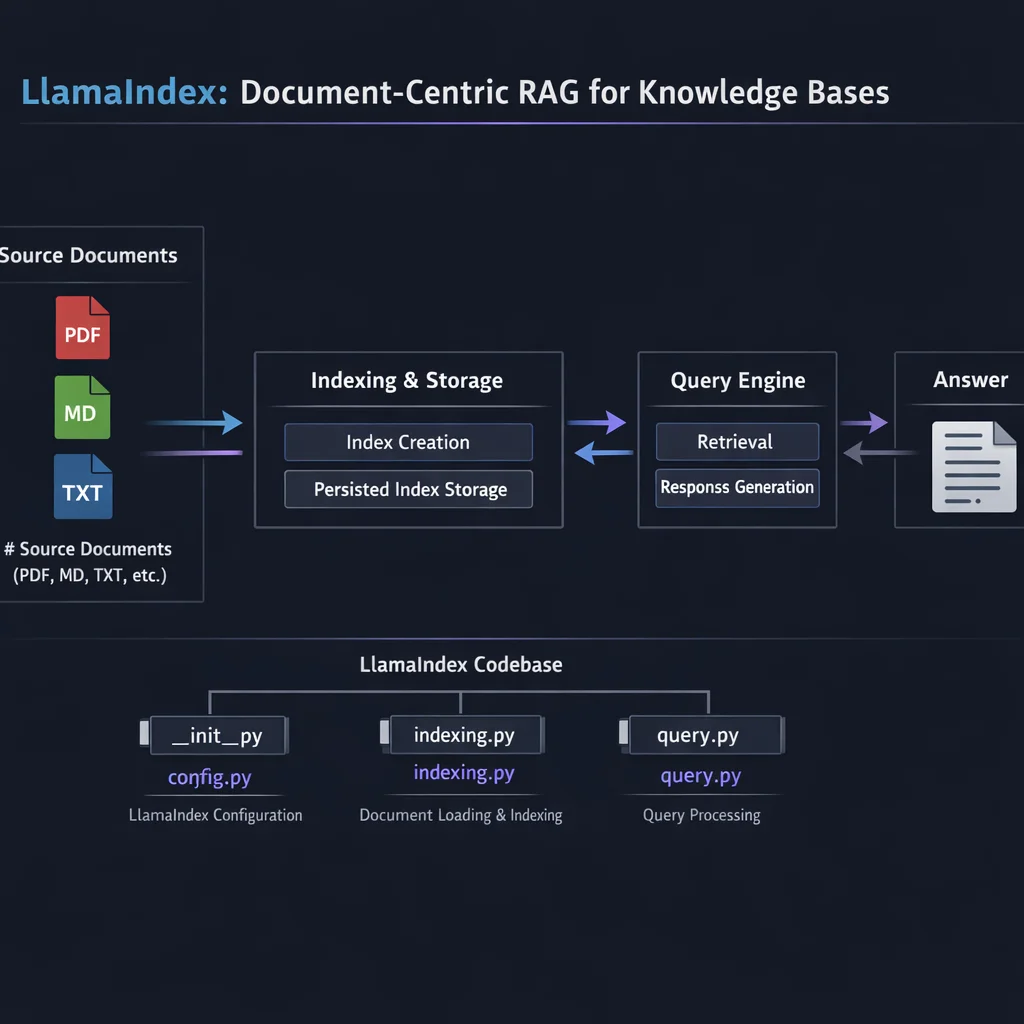# src/config.py
import os
from dotenv import load_dotenv
from llama_index.core import Settings
from llama_index.llms.openai import OpenAI
from llama_index.embeddings.openai import OpenAIEmbedding

load_dotenv()

def configure_llama_index():
    """Configure global LlamaIndex settings."""

    # Set the LLM (used for generation)
    Settings.llm = OpenAI(
        model="gpt-4o",
        temperature=0.1,
        api_key=os.getenv("OPENAI_API_KEY")
    )

    # Set the embedding model (used for indexing and retrieval)
    Settings.embed_model = OpenAIEmbedding(
        model="text-embedding-3-small",
        api_key=os.getenv("OPENAI_API_KEY")
    )

    # Chunking configuration
    Settings.chunk_size = 512
    Settings.chunk_overlap = 50

return SettingsLlamaIndex has four core abstractions that form a pipeline. Understanding these is essential before writing any code.

A Document in LlamaIndex is a container for text plus metadata. It represents an entire file, webpage, or database record before any processing.
from llama_index.core import Document

# Creating documents manually
doc = Document(
    text="This is the content of my document...",
    metadata={
        "source": "company_handbook.pdf",
        "section": "HR Policies",
        "last_updated": "2025-01-15",
        "access_level": "internal"
    }
)

# Documents can also hold excluded metadata
# (metadata that should not be embedded but is kept for filtering)
doc = Document(
    text="Sensitive financial data...",
    metadata={"department": "finance", "year": 2025},
    excluded_llm_metadata_keys=["year"],  # LLM won't see this
    excluded_embed_metadata_keys=["department"]  # Not embedded
)
The key insight: metadata flows through the entire pipeline. Filter by it during retrieval, include it in prompts, use it for access control.
Nodes are chunks of Documents with preserved relationships. When LlamaIndex splits a document, it creates Nodes that know:
from llama_index.core.schema import TextNode, NodeRelationship, RelatedNodeInfo

# Nodes maintain document structure
node = TextNode(
    text="Section 3.2: Vacation Policy...",
    metadata={"source": "handbook.pdf", "section": "3.2"},
    relationships={
        NodeRelationship.PARENT: RelatedNodeInfo(
            node_id="section_3_node_id"
        ),
        NodeRelationship.PREVIOUS: RelatedNodeInfo(
            node_id="section_31_node_id"
        )
    }
)
This relationship preservation is what enables LlamaIndex's advanced retrieval strategies like hierarchical retrieval and auto-merging.
An Index is a data structure that makes your nodes queryable. Different index types optimize for different query patterns.
from llama_index.core import VectorStoreIndex, SummaryIndex

# Most common: Vector index for semantic search
vector_index = VectorStoreIndex.from_documents(documents)

# Summary index for sequential processing
summary_index = SummaryIndex.from_documents(documents)
We will explore index types in depth below.
A Query Engine wraps an index and provides a high-level interface for asking questions. It handles retrieval, context assembly, and LLM generation.
# Basic query engine
query_engine = vector_index.as_query_engine()

# Ask questions
response = query_engine.query("What is our vacation policy?")
print(response.response)  # The answer
print(response.source_nodes) # The chunks usedLlamaIndex's data connector ecosystem, called LlamaHub, provides 300+ integrations for loading data from virtually any source. This is one of LlamaIndex's strongest features.
For local files, SimpleDirectoryReader handles most formats automatically:
from llama_index.core import SimpleDirectoryReader

# Load all supported files from a directory
documents = SimpleDirectoryReader(
    input_dir="./data/documents",
    recursive=True,  # Include subdirectories
    exclude_hidden=True
).load_data()

# Load specific file types
documents = SimpleDirectoryReader(
    input_dir="./data",
    required_exts=[".pdf", ".md", ".txt"]
).load_data()

# Load with custom filename as metadata
documents = SimpleDirectoryReader(
    input_dir="./data",
    filename_as_id=True,  # Use filename as document ID
    file_metadata=lambda filename: {"source": filename}
).load_data()
Supported formats include: PDF, DOCX, PPTX, EPUB, Markdown, HTML, CSV, JSON, and more.
from llama_index.readers.web import SimpleWebPageReader, BeautifulSoupWebReader

# Simple webpage loading
web_docs = SimpleWebPageReader(html_to_text=True).load_data(
    urls=["https://docs.example.com/api-reference"]
)

# BeautifulSoup for more control
soup_docs = BeautifulSoupWebReader().load_data(
    urls=["https://example.com/documentation"],
    custom_hostname="example.com"
)from llama_index.readers.database import DatabaseReader
from sqlalchemy import create_engine
# PostgreSQL example
engine = create_engine("postgresql://user:pass@localhost:5432/mydb")
db_reader = DatabaseReader(engine=engine)
documents = db_reader.load_data(
query="SELECT id, title, content FROM articles WHERE published = true"
)# Notion (install: pip install llama-index-readers-notion)
from llama_index.readers.notion import NotionPageReader
notion_reader = NotionPageReader(integration_token=os.getenv("NOTION_TOKEN"))
documents = notion_reader.load_data(page_ids=["page_id_1", "page_id_2"])
# Slack (install: pip install llama-index-readers-slack)
from llama_index.readers.slack import SlackReader
slack_reader = SlackReader(slack_token=os.getenv("SLACK_TOKEN"))
documents = slack_reader.load_data(channel_ids=["C01234567"])
# Google Drive (install: pip install llama-index-readers-google)
from llama_index.readers.google import GoogleDriveReader
gdrive_reader = GoogleDriveReader(credentials_path="./credentials.json")
documents = gdrive_reader.load_data(folder_id="your_folder_id")A powerful pattern is unifying multiple data sources into a single index:
from llama_index.core import VectorStoreIndex, SimpleDirectoryReader

# Load from multiple sources
pdf_docs = SimpleDirectoryReader("./data/pdfs").load_data()
notion_docs = NotionPageReader(token=token).load_data(page_ids=pages)
slack_docs = SlackReader(token=slack_token).load_data(channel_ids=channels)

# Tag each source
for doc in pdf_docs:
    doc.metadata["source_type"] = "pdf"
for doc in notion_docs:
    doc.metadata["source_type"] = "notion"
for doc in slack_docs:
    doc.metadata["source_type"] = "slack"

# Combine into single index
all_docs = pdf_docs + notion_docs + slack_docs
unified_index = VectorStoreIndex.from_documents(all_docs)LlamaIndex offers several index types, each optimized for different use cases.
The most common index type. Stores embeddings and retrieves by semantic similarity.
from llama_index.core import VectorStoreIndex

# Create from documents
index = VectorStoreIndex.from_documents(documents)

# Query
query_engine = index.as_query_engine(similarity_top_k=5)
response = query_engine.query("What are the key features?")
Use when: You have a large corpus and need semantic search. This is the default choice.
How it works: Each node is embedded, stored in a vector database, and retrieved using cosine similarity.
Processes all nodes sequentially, useful when you need to consider everything.
from llama_index.core import SummaryIndex

# Create from documents
index = SummaryIndex.from_documents(documents)

# Query (will consider all nodes)
query_engine = index.as_query_engine(response_mode="tree_summarize")
response = query_engine.query("Summarize all the key points")
Use when: You need to aggregate information across all documents, not retrieve specific chunks. Good for summarization tasks.
How it works: All nodes are passed to the LLM, often with map-reduce or tree summarization to handle token limits.
Builds a hierarchical tree of summaries, enabling both broad and specific queries.
from llama_index.core import TreeIndex

# Create tree with branching factor
index = TreeIndex.from_documents(
    documents,
    num_children=5  # Each node summarizes up to 5 children
)

# Query traverses tree
query_engine = index.as_query_engine(child_branch_factor=2)
response = query_engine.query("High-level overview of the system")
Use when: You need hierarchical summarization or have very large documents where you want to query at different granularities.
How it works: Leaf nodes are your chunks. Parent nodes are LLM-generated summaries of their children, building up to a root summary.
Extracts keywords for retrieval. Good for exact-match requirements.
from llama_index.core import KeywordTableIndex

index = KeywordTableIndex.from_documents(documents)

# Retrieves based on keyword matching
query_engine = index.as_query_engine()
response = query_engine.query("error code XJ-445")
Use when: You need keyword-based retrieval, especially for technical content with specific terms.
| Index Type | Retrieval Method | Best For | Limitations |
|---|---|---|---|
| VectorStoreIndex | Semantic similarity | General RAG, large corpora | Miss exact matches |
| SummaryIndex | Sequential/all nodes | Summarization, aggregation | Slow for large docs |
| TreeIndex | Hierarchical traversal | Multi-granularity queries | Complex setup |
| KeywordTableIndex | Keyword extraction | Exact term matching | Misses semantic meaning |
For production systems, you often want multiple indexes working together:
from llama_index.core import VectorStoreIndex, SummaryIndex
from llama_index.core.query_engine import RouterQueryEngine
from llama_index.core.selectors import LLMSingleSelector
from llama_index.core.tools import QueryEngineTool

# Create specialized indexes
vector_index = VectorStoreIndex.from_documents(documents)
summary_index = SummaryIndex.from_documents(documents)

# Create query engines
vector_engine = vector_index.as_query_engine()
summary_engine = summary_index.as_query_engine(response_mode="tree_summarize")

# Define tools
vector_tool = QueryEngineTool.from_defaults(
    query_engine=vector_engine,
    description="Useful for specific questions about details and facts"
)
summary_tool = QueryEngineTool.from_defaults(
    query_engine=summary_engine,
    description="Useful for summarization and high-level overviews"
)

# Router selects the right tool
router_engine = RouterQueryEngine(
    selector=LLMSingleSelector.from_defaults(),
    query_engine_tools=[vector_tool, summary_tool]
)

# LLM routes based on query type
response = router_engine.query("Give me a high-level summary")  # Uses summary
response = router_engine.query("What is the API rate limit?")   # Uses vector
Query engines are where LlamaIndex really shines. Beyond basic retrieval, they offer sophisticated patterns for complex queries.
from llama_index.core import VectorStoreIndex

index = VectorStoreIndex.from_documents(documents)

# Configure query engine
query_engine = index.as_query_engine(
    similarity_top_k=5,           # Retrieve top 5 chunks
    response_mode="compact",      # Fit context into single prompt
    streaming=True                # Stream response
)

# Stream the response
response = query_engine.query("Explain the authentication flow")
for token in response.response_gen:
print(token, end="", flush=True)LlamaIndex offers several response modes for different needs:
# refine: Iterate through chunks, refining the answer
engine = index.as_query_engine(response_mode="refine")

# compact: Stuff as many chunks as fit, single LLM call
engine = index.as_query_engine(response_mode="compact")

# tree_summarize: Build a tree of summaries
engine = index.as_query_engine(response_mode="tree_summarize")

# no_text: Return nodes without LLM generation
engine = index.as_query_engine(response_mode="no_text")When you have multiple indexes for different purposes, RouterQueryEngine uses the LLM to route queries:
from llama_index.core.query_engine import RouterQueryEngine
from llama_index.core.selectors import LLMSingleSelector
from llama_index.core.tools import QueryEngineTool

# Create tools from different indexes
api_tool = QueryEngineTool.from_defaults(
    query_engine=api_docs_index.as_query_engine(),
    description="API reference documentation and endpoint details"
)

tutorial_tool = QueryEngineTool.from_defaults(
    query_engine=tutorials_index.as_query_engine(),
    description="Step-by-step tutorials and guides"
)

faq_tool = QueryEngineTool.from_defaults(
    query_engine=faq_index.as_query_engine(),
    description="Frequently asked questions and common issues"
)

# Router automatically selects the right tool
router = RouterQueryEngine(
    selector=LLMSingleSelector.from_defaults(),
    query_engine_tools=[api_tool, tutorial_tool, faq_tool]
)

# Query is routed to appropriate index
response = router.query("How do I authenticate API requests?")  # → api_tool
response = router.query("Walk me through setting up my first project") # → tutorial_toolFor questions that span multiple topics or require synthesizing information:
from llama_index.core.query_engine import SubQuestionQueryEngine
from llama_index.core.tools import QueryEngineTool

# Create tools from indexes
tools = [
    QueryEngineTool.from_defaults(
        query_engine=sales_index.as_query_engine(),
        description="Sales data and revenue metrics"
    ),
    QueryEngineTool.from_defaults(
        query_engine=product_index.as_query_engine(),
        description="Product features and specifications"
    ),
    QueryEngineTool.from_defaults(
        query_engine=support_index.as_query_engine(),
        description="Customer support tickets and issues"
    )
]

# Sub-question engine breaks down complex queries
sub_question_engine = SubQuestionQueryEngine.from_defaults(
    query_engine_tools=tools
)

# Complex query gets decomposed
response = sub_question_engine.query(
    "How have product issues affected our sales this quarter?"
)
# Internally generates:
# - Sub Q1: What product issues were reported? (→ support)
# - Sub Q2: What were this quarter's sales figures? (→ sales)
# - Synthesizes into final answerquery_engine = index.as_query_engine(
similarity_top_k=10, # Retrieve top 10 most similar
)Filter retrieval based on document metadata:
from llama_index.core.vector_stores import (
    MetadataFilter,
    MetadataFilters,
    FilterOperator
)

# Create filters
filters = MetadataFilters(
    filters=[
        MetadataFilter(
            key="department",
            value="engineering",
            operator=FilterOperator.EQ
        ),
        MetadataFilter(
            key="year",
            value=2025,
            operator=FilterOperator.GTE
        )
    ]
)

# Apply to query engine
query_engine = index.as_query_engine(
    filters=filters,
    similarity_top_k=5
)

# Only retrieves from engineering docs from 2025+
response = query_engine.query("What are the coding standards?")Combine semantic and keyword search for better retrieval:
from llama_index.core import VectorStoreIndex
from llama_index.core.retrievers import BM25Retriever
from llama_index.core.retrievers import QueryFusionRetriever

# Create retrievers
vector_retriever = index.as_retriever(similarity_top_k=5)

# BM25 for keyword search
bm25_retriever = BM25Retriever.from_defaults(
    nodes=index.docstore.docs.values(),
    similarity_top_k=5
)

# Fusion retriever combines results
hybrid_retriever = QueryFusionRetriever(
    retrievers=[vector_retriever, bm25_retriever],
    num_queries=1,  # No query expansion
    use_async=True,
    similarity_top_k=10
)

# Use hybrid retrieval
from llama_index.core.query_engine import RetrieverQueryEngine

hybrid_engine = RetrieverQueryEngine.from_args(
    retriever=hybrid_retriever
)Improve retrieval quality with a reranker:
from llama_index.core.postprocessor import SentenceTransformerRerank

# Create reranker
reranker = SentenceTransformerRerank(
    model="cross-encoder/ms-marco-MiniLM-L-6-v2",
    top_n=3  # Keep top 3 after reranking
)

# Apply to query engine
query_engine = index.as_query_engine(
    similarity_top_k=10,  # Retrieve more initially
    node_postprocessors=[reranker]  # Rerank to top 3
)By default, LlamaIndex stores everything in memory. Fine for development, not for production.
# In-memory index (lost when program exits)
index = VectorStoreIndex.from_documents(documents)Save and load indexes to disk:
from llama_index.core import StorageContext, load_index_from_storage

# Create index
index = VectorStoreIndex.from_documents(documents)

# Persist to disk
index.storage_context.persist(persist_dir="./data/indexes")

# Load from disk later
storage_context = StorageContext.from_defaults(persist_dir="./data/indexes")
loaded_index = load_index_from_storage(storage_context)from llama_index.vector_stores.qdrant import QdrantVectorStore
from llama_index.core import VectorStoreIndex, StorageContext
import qdrant_client
# Connect to Qdrant
client = qdrant_client.QdrantClient(
url=os.getenv("QDRANT_URL"),
api_key=os.getenv("QDRANT_API_KEY")
)
# Create vector store
vector_store = QdrantVectorStore(
client=client,
collection_name="my_documents"
)
# Create storage context with vector store
storage_context = StorageContext.from_defaults(vector_store=vector_store)
# Create index (vectors stored in Qdrant)
index = VectorStoreIndex.from_documents(
documents,
storage_context=storage_context
)
# Later: Load existing index
index = VectorStoreIndex.from_vector_store(vector_store)from llama_index.vector_stores.postgres import PGVectorStore
from llama_index.core import VectorStoreIndex, StorageContext
# PostgreSQL connection
vector_store = PGVectorStore.from_params(
database="mydb",
host="localhost",
password=os.getenv("PG_PASSWORD"),
port=5432,
user="postgres",
table_name="llama_vectors",
embed_dim=1536 # Match your embedding model
)
storage_context = StorageContext.from_defaults(vector_store=vector_store)
# Create index
index = VectorStoreIndex.from_documents(
documents,
storage_context=storage_context
)from llama_index.vector_stores.pinecone import PineconeVectorStore
from pinecone import Pinecone
# Initialize Pinecone
pc = Pinecone(api_key=os.getenv("PINECONE_API_KEY"))
pinecone_index = pc.Index("my-index")
# Create vector store
vector_store = PineconeVectorStore(pinecone_index=pinecone_index)
storage_context = StorageContext.from_defaults(vector_store=vector_store)
index = VectorStoreIndex.from_documents(
documents,
storage_context=storage_context
)For large documents with clear structure, hierarchical parsing preserves context at multiple levels:
from llama_index.core.node_parser import HierarchicalNodeParser, get_leaf_nodes
from llama_index.core import VectorStoreIndex
from llama_index.core.retrievers import AutoMergingRetriever
from llama_index.core.storage.docstore import SimpleDocumentStore

# Create hierarchical parser with multiple chunk sizes
node_parser = HierarchicalNodeParser.from_defaults(
    chunk_sizes=[2048, 512, 128]  # Large → Medium → Small
)

# Parse documents into hierarchy
nodes = node_parser.get_nodes_from_documents(documents)

# Get leaf nodes (smallest chunks) for embedding
leaf_nodes = get_leaf_nodes(nodes)

# Store all nodes (for merging)
docstore = SimpleDocumentStore()
docstore.add_documents(nodes)

# Create vector index from leaf nodes only
storage_context = StorageContext.from_defaults(docstore=docstore)
index = VectorStoreIndex(
    leaf_nodes,
    storage_context=storage_context
)

# Auto-merging retriever
# If multiple child chunks are retrieved, merges up to parent
retriever = AutoMergingRetriever(
    index.as_retriever(similarity_top_k=12),
    storage_context=storage_context,
    simple_ratio_thresh=0.5  # Merge if >50% of children retrieved
)
This pattern is powerful for technical documentation where you want precise retrieval but need surrounding context.
Retrieve a sentence but return a larger window around it:
from llama_index.core.node_parser import SentenceWindowNodeParser
from llama_index.core.postprocessor import MetadataReplacementPostProcessor

# Parser creates sentence-level nodes with surrounding window metadata
node_parser = SentenceWindowNodeParser.from_defaults(
    window_size=3,  # 3 sentences on each side
    window_metadata_key="window",
    original_text_metadata_key="original_text"
)

nodes = node_parser.get_nodes_from_documents(documents)

# Create index
index = VectorStoreIndex(nodes)

# Post-processor replaces sentence with full window
postprocessor = MetadataReplacementPostProcessor(
    target_metadata_key="window"
)

query_engine = index.as_query_engine(
    similarity_top_k=5,
    node_postprocessors=[postprocessor]
)For knowledge that has entity relationships:
from llama_index.core import PropertyGraphIndex
from llama_index.core.indices.property_graph import SimpleLLMPathExtractor

# Extract entities and relationships using LLM
index = PropertyGraphIndex.from_documents(
    documents,
    kg_extractors=[
        SimpleLLMPathExtractor(
            llm=Settings.llm,
            max_paths_per_chunk=10
        )
    ]
)

# Query can use graph structure
query_engine = index.as_query_engine(
    include_text=True,  # Include source text
    similarity_top_k=5
)

response = query_engine.query("How is Product A related to Feature X?")Override default prompts for domain-specific behavior:
from llama_index.core import PromptTemplate

# Custom QA prompt
qa_template = PromptTemplate(
    """You are a technical support assistant for our API platform.

Context information from our documentation:
---------------------
{context_str}
---------------------

Using only the context above, answer the following question.
If the context doesn't contain the answer, say "I couldn't find this in our documentation."
Include code examples when relevant.

Question: {query_str}

Answer:"""
)

query_engine = index.as_query_engine(
    text_qa_template=qa_template
)The Problem: First query after loading takes significantly longer than subsequent queries.
# First query: 3-5 seconds (loading embeddings, warming caches)
# Subsequent queries: 200-500ms
The Solution: Warm up the index on startup:
def warmup_index(index):
    """Run a dummy query to warm caches."""
    engine = index.as_query_engine()
    _ = engine.query("warmup query")  # Discard result

# Call after loading index
index = load_index_from_storage(storage_context)
warmup_index(index)The Problem: Default character-based chunking destroys document structure.
# Bad: Naive chunking splits mid-section
"...ends the policy.\n\n3.2 Vacation Req"
"uirements\n\nEmployees must..."
The Solution: Use document-aware chunking:
from llama_index.core.node_parser import (
    MarkdownNodeParser,
    HTMLNodeParser,
    SentenceSplitter
)

# For Markdown documents
md_parser = MarkdownNodeParser()

# For HTML
html_parser = HTMLNodeParser(tags=["p", "h1", "h2", "h3", "li"])

# For general text with sentence awareness
sentence_parser = SentenceSplitter(
    chunk_size=512,
    chunk_overlap=50,
    paragraph_separator="\n\n"
)The Problem: GitHub Copilot, ChatGPT, and other AI tools often suggest LlamaIndex code from older versions. The API has changed significantly.
Common Mistakes from AI Tools:
# WRONG (old API)
from llama_index import GPTVectorStoreIndex
from llama_index import LLMPredictor, ServiceContext

# CORRECT (current API)
from llama_index.core import VectorStoreIndex, Settings
The Solution: Always check the official documentation and use llama-index >= 0.10.0 patterns.
The Problem: Loading millions of vectors into memory crashes your application.
The Solution: Use streaming and managed vector stores:
# DON'T load everything at once
# documents = SimpleDirectoryReader("./massive_corpus").load_data()

# DO use batching and external storage
from llama_index.core import VectorStoreIndex

batch_size = 100
for i, batch in enumerate(batch_documents(documents, batch_size)):
    if i == 0:
        index = VectorStoreIndex.from_documents(
            batch,
            storage_context=storage_context  # External vector store
        )
    else:
        index.insert_nodes(batch)
print(f"Indexed batch {i}")The Problem: Using different embedding models for indexing vs querying silently fails.
# Indexed with text-embedding-3-small
# Querying with text-embedding-ada-002
# Results: Garbage retrieval
The Solution: Lock embedding model in configuration and persist it:
# Always set explicitly
Settings.embed_model = OpenAIEmbedding(model="text-embedding-3-small")

# Store model name with your index metadata
index_metadata = {
    "embed_model": "text-embedding-3-small",
    "created_at": datetime.now().isoformat()
}Here is a production-ready RAG application bringing together the concepts covered:
"""
Complete LlamaIndex RAG Application
A knowledge base system with hybrid search, hierarchical retrieval, and persistence.
"""

import os
from pathlib import Path
from dotenv import load_dotenv

from llama_index.core import (
    VectorStoreIndex,
    SimpleDirectoryReader,
    Settings,
    StorageContext,
    load_index_from_storage
)
from llama_index.core.node_parser import SentenceWindowNodeParser
from llama_index.core.postprocessor import (
    MetadataReplacementPostProcessor,
    SentenceTransformerRerank
)
from llama_index.llms.openai import OpenAI
from llama_index.embeddings.openai import OpenAIEmbedding
from llama_index.vector_stores.qdrant import QdrantVectorStore
import qdrant_client

load_dotenv()


class KnowledgeBase:
    """
    Production-ready RAG knowledge base using LlamaIndex.

    Features:
    - Sentence window retrieval for precise context
    - Reranking for improved relevance
    - Persistent storage with Qdrant
    - Metadata filtering support
    """

    def __init__(
        self,
        collection_name: str = "knowledge_base",
        persist_dir: str = "./data/indexes"
    ):
        self.collection_name = collection_name
        self.persist_dir = Path(persist_dir)
        self.persist_dir.mkdir(parents=True, exist_ok=True)

        # Configure global settings
        self._configure_settings()

        # Initialize vector store
        self.vector_store = self._init_vector_store()

        # Storage context for persistence
        self.storage_context = StorageContext.from_defaults(
            vector_store=self.vector_store
        )

        # Index reference (lazy loaded)
        self._index = None

    def _configure_settings(self):
        """Configure LlamaIndex global settings."""
        Settings.llm = OpenAI(
            model="gpt-4o",
            temperature=0.1,
            api_key=os.getenv("OPENAI_API_KEY")
        )

        Settings.embed_model = OpenAIEmbedding(
            model="text-embedding-3-small",
            api_key=os.getenv("OPENAI_API_KEY")
        )

        Settings.chunk_size = 512
        Settings.chunk_overlap = 50

    def _init_vector_store(self) -> QdrantVectorStore:
        """Initialize Qdrant vector store."""
        # Use in-memory Qdrant for development
        # Replace with cloud Qdrant for production
        client = qdrant_client.QdrantClient(
            url=os.getenv("QDRANT_URL", ":memory:"),
            api_key=os.getenv("QDRANT_API_KEY", None)
        )

        return QdrantVectorStore(
            client=client,
            collection_name=self.collection_name
        )

    @property
    def index(self) -> VectorStoreIndex:
        """Lazy load or create index."""
        if self._index is None:
            try:
                # Try to load existing index
                self._index = VectorStoreIndex.from_vector_store(
                    self.vector_store
                )
                print(f"Loaded existing index: {self.collection_name}")
            except Exception:
                # Create empty index if none exists
                self._index = VectorStoreIndex(
                    nodes=[],
                    storage_context=self.storage_context
                )
                print(f"Created new index: {self.collection_name}")
        return self._index

    def ingest_documents(
        self,
        input_dir: str,
        file_types: list[str] = None,
        metadata: dict = None
    ) -> int:
        """
        Ingest documents from a directory into the knowledge base.

        Args:
            input_dir: Directory containing documents
            file_types: List of file extensions to include (e.g., [".pdf", ".md"])
            metadata: Additional metadata to add to all documents

        Returns:
            Number of documents ingested
        """
        # Load documents
        reader_kwargs = {
            "input_dir": input_dir,
            "recursive": True,
            "filename_as_id": True
        }

        if file_types:
            reader_kwargs["required_exts"] = file_types

        documents = SimpleDirectoryReader(**reader_kwargs).load_data()

        # Add custom metadata
        if metadata:
            for doc in documents:
                doc.metadata.update(metadata)

        # Parse with sentence window for better retrieval
        node_parser = SentenceWindowNodeParser.from_defaults(
            window_size=3,
            window_metadata_key="window",
            original_text_metadata_key="original_text"
        )

        nodes = node_parser.get_nodes_from_documents(documents)

        # Insert into index
        self.index.insert_nodes(nodes)

        print(f"Ingested {len(documents)} documents ({len(nodes)} nodes)")
        return len(documents)

    def create_query_engine(
        self,
        similarity_top_k: int = 10,
        rerank_top_n: int = 5,
        use_reranker: bool = True,
        metadata_filters: dict = None
    ):
        """
        Create a configured query engine.

        Args:
            similarity_top_k: Number of chunks to retrieve initially
            rerank_top_n: Number of chunks after reranking
            use_reranker: Whether to use cross-encoder reranking
            metadata_filters: Optional filters for retrieval

        Returns:
            Configured query engine
        """
        # Post-processors
        postprocessors = [
            # Replace sentence with full window
            MetadataReplacementPostProcessor(
                target_metadata_key="window"
            )
        ]

        # Add reranker if enabled
        if use_reranker:
            postprocessors.append(
                SentenceTransformerRerank(
                    model="cross-encoder/ms-marco-MiniLM-L-6-v2",
                    top_n=rerank_top_n
                )
            )

        # Build query engine
        query_engine = self.index.as_query_engine(
            similarity_top_k=similarity_top_k,
            node_postprocessors=postprocessors,
            response_mode="compact",
            streaming=False
        )

        return query_engine

    def query(
        self,
        question: str,
        similarity_top_k: int = 10,
        rerank_top_n: int = 5,
        return_sources: bool = False
    ) -> dict:
        """
        Query the knowledge base.

        Args:
            question: The question to answer
            similarity_top_k: Number of chunks to retrieve
            rerank_top_n: Number of chunks after reranking
            return_sources: Whether to include source nodes in response

        Returns:
            Dictionary with answer and optionally sources
        """
        engine = self.create_query_engine(
            similarity_top_k=similarity_top_k,
            rerank_top_n=rerank_top_n
        )

        response = engine.query(question)

        result = {
            "answer": str(response),
            "question": question
        }

        if return_sources:
            result["sources"] = [
                {
                    "text": node.node.text,
                    "score": node.score,
                    "metadata": node.node.metadata
                }
                for node in response.source_nodes
            ]

        return result


def main():
    """Example usage of the knowledge base."""

    # Initialize knowledge base
    kb = KnowledgeBase(collection_name="docs_kb")

    # Ingest documents (run once or when documents change)
    # kb.ingest_documents(
    #     input_dir="./data/documents",
    #     file_types=[".pdf", ".md", ".txt"],
    #     metadata={"source": "internal_docs", "version": "2025.01"}
    # )

    # Query the knowledge base
    result = kb.query(
        question="What is our vacation policy?",
        return_sources=True
    )

    print(f"Question: {result['question']}")
    print(f"\nAnswer: {result['answer']}")

    if result.get("sources"):
        print(f"\nSources ({len(result['sources'])}):")
        for i, source in enumerate(result["sources"], 1):
            print(f"  {i}. Score: {source['score']:.3f}")
            print(f"     File: {source['metadata'].get('file_name', 'Unknown')}")


if __name__ == "__main__":
main()# 1. Install dependencies
pip install llama-index llama-index-llms-openai llama-index-embeddings-openai \
llama-index-vector-stores-qdrant sentence-transformers python-dotenv
# 2. Set up environment
echo "OPENAI_API_KEY=sk-proj-your-key" > .env
# 3. Add documents to ./data/documents/
# 4. Run
python main.pyHaving covered both frameworks, here is a decision guide:
| Criterion | Choose LlamaIndex | Choose LangChain |
|---|---|---|
| Primary focus | Document retrieval/RAG | General AI orchestration |
| Document structure | Complex, hierarchical | Simple, flat |
| Data sources | Many diverse sources | Few, well-defined sources |
| Retrieval sophistication | Advanced (auto-merge, hierarchical) | Basic to intermediate |
| Beyond RAG | Limited (retrieval-focused) | Extensive (agents, chains) |
| Learning curve | Steeper initially | More gradual |
| Abstraction level | Higher (more magic) | Lower (more control) |
Choose LlamaIndex when your primary use case is building a knowledge base from complex documents, and you want sophisticated retrieval out of the box.
Choose LangChain when RAG is one component of a larger AI system, or you need fine-grained control over every step.
Use both when you need LlamaIndex's document processing with LangChain's orchestration:
# LlamaIndex for indexing, LangChain for orchestration
from llama_index.core import VectorStoreIndex
from langchain.tools import Tool
from langchain.agents import AgentExecutor

# Create LlamaIndex query engine
index = VectorStoreIndex.from_documents(documents)
query_engine = index.as_query_engine()

# Wrap as LangChain tool
def query_knowledge_base(question: str) -> str:
    response = query_engine.query(question)
    return str(response)

kb_tool = Tool(
    name="KnowledgeBase",
    func=query_knowledge_base,
    description="Search our documentation for answers"
)

# Use in LangChain agent
# agent = create_agent(tools=[kb_tool, ...])You now have a solid foundation in LlamaIndex for building document-centric RAG systems. The framework's strength lies in its sophisticated handling of document structure and retrieval strategies.
In the next article, we will explore Haystack, deepset's enterprise-focused RAG framework. Haystack brings production-ready features like evaluation, observability, and deployment patterns that complement the retrieval sophistication we have covered here.
Key takeaways from this article:
This is Part 3 of the "Building RAG Systems: A Platform-by-Platform Guide" series. Previous: Part 2 - LangChain RAG. Next up: Part 4 - Haystack: Enterprise RAG Pipelines.
Discover more content:
