 Tom Hundley
The infrastructure that turns 47 notifications into one page of decisions
In Part 1, we met Ricky Blaze and his food truck, Smoke & Sizzle. We introduced the core philosophy: If it touches a screen, AI does it first.
The centerpiece of that philosophy was The Rivergate Weekly Brief—a single-page document that told Ricky everything he needed to know about his business, with decisions pre-made and waiting for approval.
What we didn't cover was how that brief actually gets built.
This isn't magic. It's architecture. And today, we're going to build it.
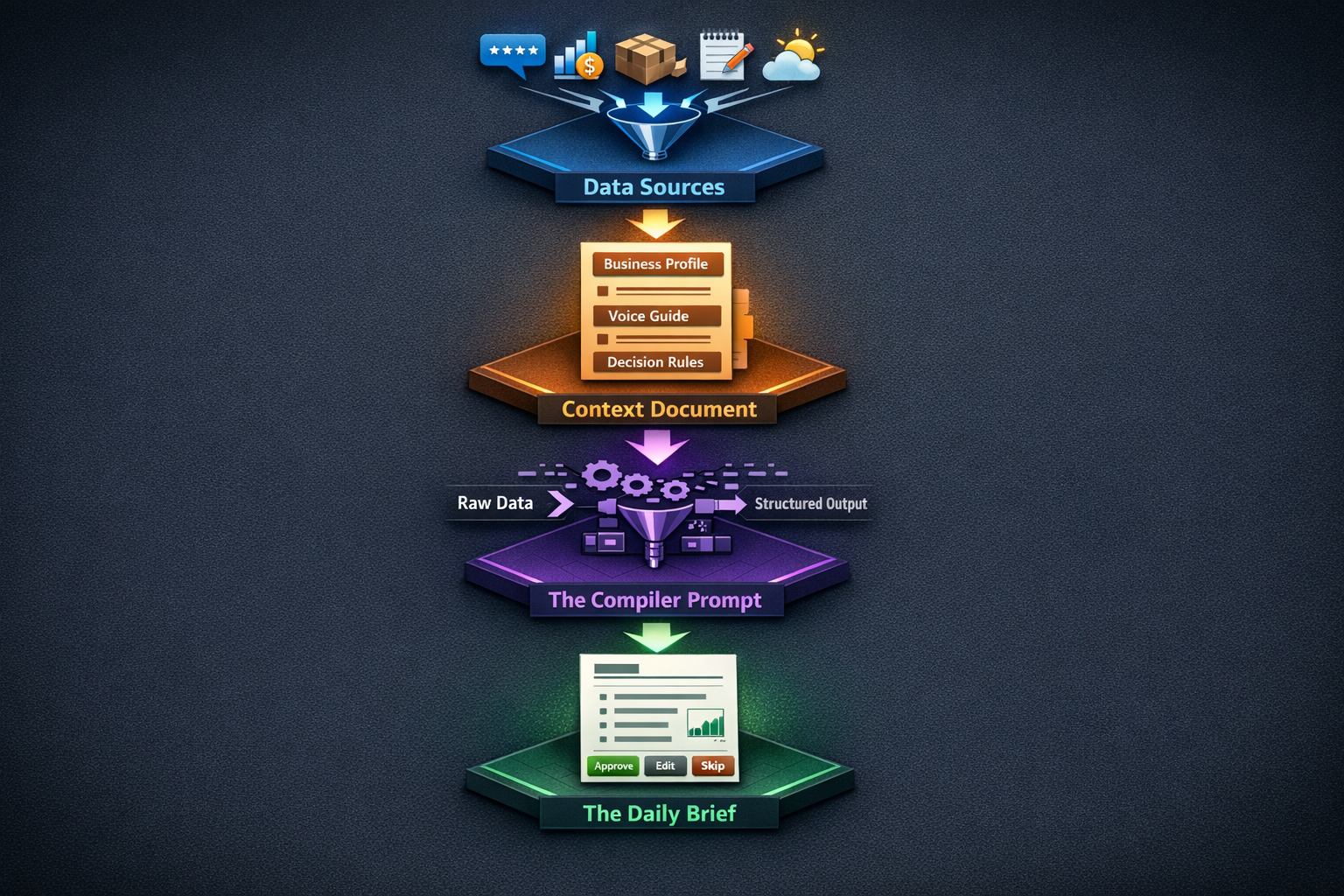
Here's what we're constructing:
Time to set up: 2-3 hours (one-time investment)
Time to run daily: 10-15 minutes of data gathering, 2 minutes of AI processing
Time saved weekly: 8-12 hours of scattered admin work
Let's build each layer.
Before AI can write for you, it needs to understand who you are. This is where most people go wrong—they jump straight to asking AI questions without giving it the context to answer intelligently.
The Context Document is your AI's training manual. Ricky's looks like this:
# BUSINESS CONTEXT: Smoke & Sizzle Mobile Kitchen

## Identity
- **Business:** Smoke & Sizzle Mobile Kitchen
- **Type:** Premium BBQ food truck operating in Rivergate area
- **Owner:** Ricky Blaze
- **GM:** Tasha (handles day-to-day operations)
- **Brand Position:** "Local legend meets professional operation"

## Voice & Tone
When writing as Smoke & Sizzle:
- Sound like a proud pitmaster who takes craft seriously but doesn't take himself too seriously
- Use "we" not "I" (it's a team)
- Humble about wins, ownership-taking about problems
- Never corporate-speak. Never "we apologize for any inconvenience."
- Okay to be a little playful, but never cheesy

### Good Examples:
- "Ran out of brisket at 2pm yesterday. That's on us—we underestimated how hungry y'all were. Adding 20% more to Saturday's prep."
- "Thanks for the kind words! The secret is 14 hours of patience and a whole lot of post oak."

### Bad Examples:
- "We sincerely apologize for any inconvenience caused by our inventory shortage." (too corporate)
- "OMG you guys are THE BEST!!! 🔥🔥🔥" (too much)

## Decision Rules
### Spending Authority
- Under $100: Auto-approve routine supplies
- $100-$300: Flag for Ricky's attention, recommend action
- Over $300: Require explicit approval before proceeding

### Review Response Rules
- 5-star reviews: Thank genuinely, mention something specific if possible
- 4-star reviews: Thank, acknowledge any feedback
- 3-star reviews: Thank, take ownership if valid, explain (don't excuse) if not
- 1-2 star reviews: Draft only, require Ricky's review before posting
- Never offer free food in responses
- Never argue with customers publicly

### Escalation Triggers
Always flag for immediate human attention:
- Any food safety issue
- Any employee conflict
- Any legal mention (health inspector, lawsuit, etc.)
- Any equipment failure over $500
- Any customer threatening social media exposure

## Operating Metrics
### Targets
- Food cost ratio: 32% or below
- Labor cost: 28% or below
- Daily revenue target: $1,800 weekday, $2,500 weekend

### Warning Thresholds
- Brisket selling out before 3pm = underprepped
- More than 15% waste = overprepped
- Wait times over 20 minutes = staffing issueWithout this document, AI will:
With this document, AI becomes an extension of your brain—one that never forgets the rules.
Start with these sections:
Pro tip: Build this document over time. Every time AI gets something wrong, add a rule. Every time you have to explain context, add it to the identity section.
The Brief is only as good as the data feeding it. Here's what Ricky pipes in:
Where it comes from: Square (his POS system)
What he exports: Daily sales summary, item-by-item breakdown, payment types
Format: CSV or copy-paste from the Square dashboard
Sample data:
Date: 2025-01-14
Total Revenue: $2,147
Transactions: 89
Average Ticket: $24.12

Top Items:
- Brisket Plate (34)
- Pulled Pork Sandwich (28)
- Loaded Nachos (19)
- Smoked Wings (15)

Items 86'd: Brisket (1:47 PM), Mac & Cheese (3:15 PM)Where it comes from: Google Business Profile, Yelp
What he captures: All new reviews since last brief
Format: Copy-paste with rating, date, and full text
Sample data:
GOOGLE - 5 stars - Jan 14
"Best brisket in Rivergate. The burnt ends were incredible. Only complaint is the wait but it's worth it."

GOOGLE - 3 stars - Jan 14
"Food was good but took forever. Waited 25 minutes for a sandwich. Staff seemed overwhelmed."

YELP - 4 stars - Jan 13
"Solid BBQ. Portions could be bigger for the price but quality is there."Where it comes from: Text messages from Tasha, shift notes
What he captures: Anything operational—equipment issues, customer incidents, staffing problems
Format: Raw text, forwarded from messages
Sample data:
From Tasha (6:47 PM):
Freezer 2 was reading 38 degrees when I got here. Moved the ribs to freezer 1. Seems like it's the compressor again. Still under warranty I think?

From Tasha (closing):
Good day overall. Marcus called out sick so we were short on the line. That's why the wait times got long. Need to talk about backup coverage.Where it comes from: Manual count or inventory app
What he captures: Current stock of key items, what's low, what's expiring
Format: Simple list
Sample data:
Brisket: 45 lbs (2 days supply at current rate)
Pork shoulder: 60 lbs (3+ days)
Ribs: 20 racks (need to reorder)
Mac & cheese base: LOW - ran out today
Napkins: Good
To-go containers (large): Running lowWhere it comes from: Weather app, local events calendar
What he captures: Anything that affects traffic—weather, events, road closures
Format: Brief notes
Sample data:
Weather: Saturday high of 72, sunny. Perfect food truck weather.
Events: Rivergate Farmers Market on Saturday (usually +30% traffic)
Road work: None affecting our spotsThis is where the magic happens. The Compiler Prompt takes all your raw data, applies your Context Document, and produces The Brief.
You are the Operations Intelligence System for Smoke & Sizzle Mobile Kitchen.

## Your Context
[PASTE CONTEXT DOCUMENT HERE]

## Your Task
Compile the following data into "The Rivergate Weekly Brief"—a single-page executive summary for owner Ricky Blaze.

## Input Data

### Sales Data
[PASTE SALES DATA]

### Reviews
[PASTE REVIEWS]

### Staff Notes
[PASTE STAFF NOTES]

### Inventory Status
[PASTE INVENTORY]

### External Factors
[PASTE WEATHER/EVENTS]

## Output Format

Create a brief with these exact sections:

### OPERATIONS
- List equipment issues with cost estimates and recommended actions
- Flag staffing problems with suggested solutions
- Note any 86'd items with root cause if known

### REVIEWS
- Summary: X new reviews (breakdown by star rating)
- For any review 3 stars or below: Draft a response following voice guidelines
- Flag any reviews requiring owner attention
- Format responses as: [Approve] [Edit] [Skip]

### FINANCE
- Weekly revenue with % change vs. last week
- Food cost ratio vs. target
- Flag any metrics outside normal range
- List any pending orders with [Approve] [Edit] options

### INVENTORY
- Items needing reorder (sorted by urgency)
- Auto-generate suggested order based on sales trends
- Format as: [Approve] [Edit]

### FORECAST
- Expected traffic based on weather/events
- Prep recommendations based on forecast
- Any schedule adjustments needed

### DECISION QUEUE
- List all items requiring owner decision
- For each: Context, Recommendation, Options

## Rules
- Keep total brief under 500 words
- Lead with most important item in each section
- Use bullet points, not paragraphs
- Include $ amounts where relevant
- Never recommend spending over $300 without flagging for approval
- Never auto-approve responses to negative reviewsOutput time: About 30 seconds
What you get back is a ready-to-act brief. Decisions framed. Responses drafted. Numbers summarized.
Here's what Ricky actually received on January 15th:
THE RIVERGATE BRIEF
Smoke & Sizzle Mobile Kitchen | January 15, 2025
3 new reviews: 1 × 5-star, 1 × 4-star, 1 × 3-star
3-star review (requires attention):
"Food was good but took forever. Waited 25 minutes for a sandwich. Staff seemed overwhelmed."
Draft response:
"Fair point—yesterday's wait times weren't up to our standard. We were short-staffed and it showed. That's on us. Appreciate you still giving us a shot, and we'll have the crew back to full strength this weekend."
[Approve] [Edit] [Skip]
Auto-generated Sysco order based on sales trend:
Est. total: $847 [Approve Order] [Edit Order]
| Item | Recommendation | Action |
|---|---|---|
| Freezer service | Schedule warranty call | [Approve] |
| Sysco order ($847) | Approve with brisket increase | [Approve] [Edit] |
| 3-star review response | Post as drafted | [Approve] [Edit] |
| Backup staffing list | Assign to Tasha | [Approve] |
Time for Ricky to process this: 4 minutes.
Four taps on "Approve." One quick edit to make the review response sound a bit more like him. Done.
Compare that to the alternative: checking Square, logging into Google, reading through Tasha's texts, doing the Sysco order from scratch, writing review responses from blank pages. That's 90+ minutes of scattered work.
Right now, this system requires manual data gathering. You're copying and pasting from various sources into your AI prompt. That's fine for getting started—it still saves massive time.
But as you get comfortable, you can automate:
Save your Compiler Prompt as a template. Each day, you just fill in the variable sections.
Use tools like Zapier or Make to automatically pull data from your sources into a single document. Your daily task becomes: open document, copy, paste into AI.
Build custom integrations that pipe data directly into AI APIs and deliver The Brief to your inbox each morning. This is where we help clients at Elegant Software Solutions—taking manual AI workflows and making them truly hands-off.
For now? Start with copy-paste. The ROI is already there.
Don't try to build the whole system today. Start with the foundation.
Spend 30 minutes on this. Save it somewhere you can find it.
Next time you ask AI to write anything for your business, paste this document first. Watch the difference in quality.
In Part 3, we'll dive into the specific subsystems: review response automation, inventory forecasting, and the "Staff Notes to Action Items" pipeline. We'll show you exactly how Ricky handles each one, with copy-paste prompts you can steal.
In Part 4, we'll tackle the hardest part: social media and marketing content at scale without losing your authentic voice.
The goal by the end of this series: you'll have a complete "Personal AI Assistant" architecture running your business admin—one that sounds like you, thinks like you, and frees you to do the work that actually grows your business.
Previous in the series: Part 1 - The Zero-Admin Hospitality Business
Next in the series: Part 3 - Review Response Automation (Coming Soon)
Building your own AI intelligence layer? We'd love to hear what's working. Reach out through our contact page.
Tools Mentioned:
Related Reading:
Discover more content:
