
The Model Context Protocol (MCP), originally introduced by Anthropic in late 2024, has rapidly evolved from a developer convenience into a critical enterprise integration layer. As organizations deploy AI agents that interact with business systems — from CRM platforms to advertising APIs to identity providers — the security surface area expands dramatically.
The MCP ecosystem is maturing quickly. Vendors across the industry are building MCP server implementations that connect AI agents to their platforms, and the community is actively developing security extensions to address enterprise requirements. This creates both opportunity and risk: teams can now wire AI agents into production workflows faster than ever, but without rigorous security patterns, those agents become vectors for data exfiltration, privilege escalation, and unintended destructive operations.
This article provides a practical, code-informed guide to securing MCP server implementations in enterprise environments. We'll cover transport-layer security, tool permission models, cryptographic signing of tool descriptions, audit logging, and human-in-the-loop patterns for high-risk operations. Whether you're evaluating MCP for the first time or hardening an existing deployment, these patterns will help you build secure, auditable AI agent infrastructure.
Before diving into implementation, it's important to understand what makes MCP security distinct from traditional API security. In a conventional API integration, a human user initiates requests, reviews responses, and makes decisions. In an MCP-enabled system, an AI agent autonomously discovers available tools, selects which to invoke, constructs parameters, and chains results — often without human oversight.
Traditional API security assumes a human in the decision loop. Rate limiting, OAuth scopes, and RBAC (Role-Based Access Control) all help, but they weren't designed for autonomous agents that can:
This means MCP security must address not just who is calling, but what the agent is allowed to do, how it discovered that capability, and whether a human should approve before execution.
A well-secured MCP deployment establishes multiple trust boundaries:
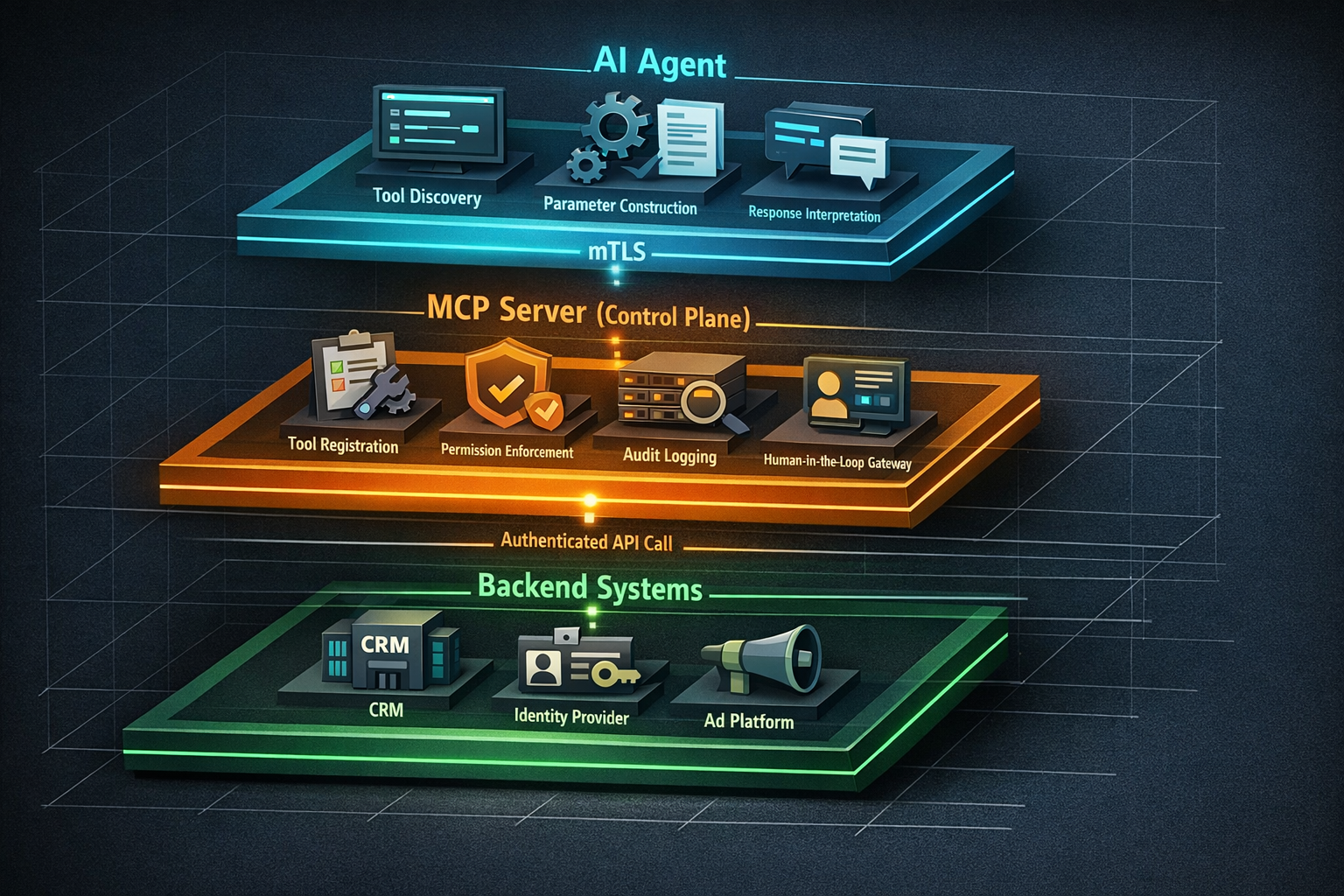
Each boundary requires its own security controls. Let's implement them.
The foundation of any secure MCP deployment is encrypted, mutually authenticated transport. The MCP specification supports both stdio (for local development) and HTTP with Server-Sent Events (SSE) for networked deployments. In production, you should enforce mutual TLS (mTLS) on all HTTP-based MCP connections.
mTLS ensures that both the MCP client (the AI agent's runtime) and the MCP server authenticate each other via X.509 certificates. This prevents unauthorized agents from connecting to your MCP servers and prevents agents from connecting to rogue servers.
Here's a practical Node.js implementation using the MCP TypeScript SDK:
import { McpServer } from '@modelcontextprotocol/sdk/server/mcp.js';
import { SSEServerTransport } from '@modelcontextprotocol/sdk/server/sse.js';
import https from 'node:https';
import fs from 'node:fs';
import express from 'express';

const app = express();

// mTLS configuration
const serverOptions: https.ServerOptions = {
  key: fs.readFileSync('/certs/server-key.pem'),
  cert: fs.readFileSync('/certs/server-cert.pem'),
  ca: fs.readFileSync('/certs/ca-cert.pem'),
  requestCert: true,        // Require client certificate
  rejectUnauthorized: true, // Reject connections without valid cert
};

const mcpServer = new McpServer({
  name: 'enterprise-secure-server',
  version: '1.0.0',
});

// Middleware to extract and validate client identity
app.use((req, res, next) => {
  const clientCert = req.socket.getPeerCertificate();
  if (!clientCert || !clientCert.subject) {
    return res.status(403).json({ error: 'Client certificate required' });
  }

  // Attach client identity to request for downstream authorization
  req.agentIdentity = {
    commonName: clientCert.subject.CN,
    organization: clientCert.subject.O,
    fingerprint: clientCert.fingerprint256,
  };

  next();
});

const httpsServer = https.createServer(serverOptions, app);
httpsServer.listen(3443, () => {
  console.log('Secure MCP server listening on port 3443 with mTLS');
});
This ensures that every connection to your MCP server is both encrypted and authenticated at the transport layer — before any tool invocation occurs.
Transport security tells you who is connecting. Tool permissions control what they can do. This is where the MCP ecosystem is evolving most rapidly, with the community developing patterns for categorizing tools by risk level and enforcing appropriate controls.
A best practice emerging in enterprise MCP deployments is to annotate every tool with explicit permission flags that indicate its risk level. The two most important categories are readOnly and destructive:
import { z } from 'zod';

// Read-only tool: no human approval needed
mcpServer.tool(
  'get-user-profile',
  'Retrieves a user profile by ID',
  {
    userId: z.string().describe('The user ID to look up'),
  },
  async ({ userId }, extra) => {
    // Permission metadata (consumed by the orchestration layer)
    const toolMeta = {
      permission: 'readOnly',
      requiresApproval: false,
      dataClassification: 'internal',
    };

    const profile = await userService.getProfile(userId);
    return {
      content: [{ type: 'text', text: JSON.stringify(profile) }],
      _meta: toolMeta,
    };
  }
);

// Destructive tool: requires human-in-the-loop approval
mcpServer.tool(
  'delete-user-account',
  'Permanently deletes a user account and all associated data',
  {
    userId: z.string().describe('The user ID to delete'),
    reason: z.string().describe('Reason for account deletion'),
  },
  async ({ userId, reason }, extra) => {
    const toolMeta = {
      permission: 'destructive',
      requiresApproval: true,
      approvalChannel: 'slack-ops-approvals',
      dataClassification: 'pii',
    };

    // This tool should NEVER execute without human approval.
    // The approval gate is enforced at the orchestration layer.
    // See the human-in-the-loop section below.
    throw new Error(
      'Destructive tools must be invoked through the approval gateway'
    );
  }
);One emerging security pattern is cryptographically signing tool descriptions to prevent tampering. If an attacker can modify a tool's description (via prompt injection or a compromised server), they can trick the AI agent into invoking dangerous operations. Signing tool descriptions with a known key ensures integrity.
import crypto from 'node:crypto';

function signToolDescription(tool: ToolDefinition, privateKey: string): string {
  const canonical = JSON.stringify({
    name: tool.name,
    description: tool.description,
    inputSchema: tool.inputSchema,
    permission: tool.permission,
  });

  const sign = crypto.createSign('SHA256');
  sign.update(canonical);
  return sign.sign(privateKey, 'base64');
}

function verifyToolDescription(
  tool: ToolDefinition,
  signature: string,
  publicKey: string
): boolean {
  const canonical = JSON.stringify({
    name: tool.name,
    description: tool.description,
    inputSchema: tool.inputSchema,
    permission: tool.permission,
  });

  const verify = crypto.createVerify('SHA256');
  verify.update(canonical);
  return verify.verify(publicKey, signature, 'base64');
}
The MCP client should verify these signatures before allowing the agent to invoke any tool. This is especially critical in multi-server environments where the agent discovers tools from multiple sources.
For a broader look at credential management in agent architectures, see our guide on AI Agents and API Keys: The Complete Security Guide for Enterprise Teams.
The most important security pattern for enterprise MCP deployments is ensuring that destructive operations require explicit human approval. This isn't just good practice — for many regulated industries, it's a compliance requirement.
An approval gateway sits between the MCP server and the actual backend operation. When a destructive tool is invoked, the gateway pauses execution, notifies a human approver, and waits for confirmation before proceeding.
import { EventEmitter } from 'node:events';

interface ApprovalRequest {
  id: string;
  toolName: string;
  parameters: Record<string, unknown>;
  agentIdentity: AgentIdentity;
  requestedAt: Date;
  status: 'pending' | 'approved' | 'denied';
  reviewedBy?: string;
  reviewedAt?: Date;
}

class ApprovalGateway extends EventEmitter {
  private pendingApprovals = new Map<string, ApprovalRequest>();
  private readonly timeoutMs: number;

  constructor(timeoutMs = 300_000) { // 5-minute default timeout
    super();
    this.timeoutMs = timeoutMs;
  }

  async requestApproval(
    toolName: string,
    parameters: Record<string, unknown>,
    agentIdentity: AgentIdentity
  ): Promise<boolean> {
    const request: ApprovalRequest = {
      id: crypto.randomUUID(),
      toolName,
      parameters,
      agentIdentity,
      requestedAt: new Date(),
      status: 'pending',
    };

    this.pendingApprovals.set(request.id, request);

    // Send notification (Slack, email, dashboard, etc.)
    await this.notifyApprovers(request);

    // Wait for approval or timeout
    return new Promise((resolve) => {
      const timeout = setTimeout(() => {
        request.status = 'denied'; // Timeout = deny
        this.pendingApprovals.delete(request.id);
        resolve(false);
      }, this.timeoutMs);

      this.once(`approval:${request.id}`, (approved: boolean) => {
        clearTimeout(timeout);
        request.status = approved ? 'approved' : 'denied';
        this.pendingApprovals.delete(request.id);
        resolve(approved);
      });
    });
  }

  // Called by your approval UI (Slack bot, web dashboard, etc.)
  submitReview(requestId: string, approved: boolean, reviewer: string) {
    const request = this.pendingApprovals.get(requestId);
    if (request) {
      request.reviewedBy = reviewer;
      request.reviewedAt = new Date();
      this.emit(`approval:${requestId}`, approved);
    }
  }
}
Note the critical design decision: timeout defaults to denial. If no human responds within the timeout window, the operation is rejected. This fail-closed behavior is essential for secure AI agent deployment.
Every tool invocation in a production MCP server must be logged with sufficient detail for both compliance auditing and operational debugging. The log entries should capture the full lifecycle of each request.
interface McpAuditLogEntry {
  timestamp: string;          // ISO 8601
  requestId: string;          // Unique per invocation
  agentIdentity: {            // From mTLS cert or auth token
    commonName: string;
    fingerprint: string;
  };
  tool: {
    name: string;
    permission: 'readOnly' | 'destructive';
    signatureValid: boolean;
  };
  parameters: Record<string, unknown>; // Redact PII as needed
  approval?: {
    required: boolean;
    approvedBy?: string;
    approvedAt?: string;
    decision: 'approved' | 'denied' | 'timeout';
  };
  result: {
    status: 'success' | 'error' | 'denied';
    durationMs: number;
    errorMessage?: string;
  };
}
Send these logs to an immutable store — a SIEM (Security Information and Event Management) system, append-only database, or cloud logging service with tamper-evident guarantees. The audit trail should be queryable by agent identity, tool name, time range, and approval status.
Be deliberate about what enters your audit logs:
Beyond the code-level patterns above, several architectural decisions affect the security of your MCP deployment at scale.
Deploy MCP servers in a dedicated network segment with explicit firewall rules. AI agents should connect to MCP servers through a load balancer that enforces mTLS termination, and MCP servers should connect to backend systems through a service mesh or API gateway with its own authentication.
MCP servers often need credentials to call backend APIs. Never embed these in the server code or environment variables. Use a secrets manager (HashiCorp Vault, AWS Secrets Manager, Azure Key Vault) with short-lived, auto-rotating credentials.
AI agents can generate bursts of tool invocations that overwhelm backend systems. Implement per-agent rate limits at the MCP server layer, and use circuit breakers to prevent cascading failures when backends are degraded.
MCP is an open protocol originally introduced by Anthropic that standardizes how AI agents discover and invoke tools (APIs, databases, services). Unlike traditional API integrations where humans drive every request, MCP enables autonomous tool discovery and invocation — which means security must account for agents making independent decisions about what to call and when. Enterprise security patterns like mTLS, tool signing, and human-in-the-loop approvals are essential to prevent unauthorized actions.
Apply a simple risk-based framework: any tool that creates, modifies, or deletes data should be flagged as potentially destructive. Within that category, classify by impact — deleting a user account requires approval; updating a display name might not. Start conservative (require approval for all write operations) and relax controls as you build confidence in your agent's behavior patterns.
Yes. MCP servers should integrate with your existing identity infrastructure for both agent authentication and user-context delegation. Use OAuth 2.0 token exchange to allow agents to act within the scope of a specific user's permissions, ensuring the agent can never exceed the privileges of the human it's acting for. Your identity provider issues scoped, short-lived tokens that the MCP server validates on every tool invocation.
readOnly vs. destructive) and enforce them at the server layerSecuring MCP servers for enterprise deployment is not a future concern — it's a present requirement. As AI agents gain the ability to interact with production business systems, the security patterns you implement today determine whether those agents are assets or liabilities.
The patterns in this guide — mTLS transport, signed tool descriptions, risk-categorized permissions, human-in-the-loop approval gateways, and structured audit logging — form a defense-in-depth approach that meets enterprise security and compliance requirements without sacrificing the productivity benefits of AI agents.
The MCP ecosystem is evolving rapidly, with vendors and the open-source community continuously improving security capabilities. Organizations that invest in secure foundations now will be best positioned to adopt new MCP integrations as they emerge.
At Elegant Software Solutions, our AI Implementation engagements help engineering teams design and deploy secure MCP server architectures integrated with your existing identity, security, and compliance infrastructure. If you're building AI agent capabilities and need to get the security right from day one, schedule a conversation with our team.
Discover more content:
