 Tom Hundley
Part 4 of 7
One Claude session handling everything leads to what the community calls "context pollution"—concerns bleed together, conversations become unfocused, and the context window fills with irrelevant information. The solution: subagents.
Subagents are specialized AI assistants with their own isolated context windows. They can work in parallel, focus on specific domains, and return only relevant results to the main conversation. As Anthropic's engineering team notes: "Telling Claude to use subagents to verify details or investigate particular questions tends to preserve context availability without much downside in terms of lost efficiency."
Consider a complex task: "Review my PR, check for security issues, and update the documentation."
Without subagents, Claude juggles three concerns in one context window. The PR diff mixes with security analysis, which mixes with documentation changes. By the time it's done, the context is cluttered and follow-up questions suffer.
With subagents:
Each agent maintains focus. The main context stays clean.
Claude Code includes three built-in subagent types:
Access to all tools, used for complex multi-step tasks that need full capabilities.
Used in plan mode for codebase research and exploration. Read-heavy operations that inform planning decisions.
A fast, read-only agent optimized for quick searches. Uses the Haiku model for speed. Perfect for:
Example:
"Use an explore agent to find all files that handle authentication"
Custom subagents live in:
.claude/agents/ — Project-level (team-shared)~/.claude/agents/ — User-level (personal)Each agent is a Markdown file with YAML frontmatter:
---
name: code-reviewer
description: Expert code review focusing on quality and security. Use proactively after significant code changes.
tools: Read, Grep, Glob, Bash
model: sonnet
permissionMode: default
---

You are a senior code reviewer with expertise in TypeScript and React.

## Your Focus Areas

1. **Code Quality**
   - Clear naming and structure
   - Appropriate abstractions
   - No code duplication

2. **Security**
   - Input validation
   - Authentication checks
   - No exposed secrets

3. **Performance**
   - Unnecessary re-renders
   - Expensive operations
   - Memory leaks

## Review Process

1. Understand the change context
2. Check for obvious issues first
3. Deep dive into complex logic
4. Provide specific, actionable feedback| Field | Required | Description |
|---|---|---|
name |
Yes | Lowercase, hyphens, max 64 chars |
description |
Yes | When Claude should delegate (max 1024 chars) |
tools |
No | Comma-separated; omit to inherit all |
model |
No | sonnet, opus, haiku, or inherit |
permissionMode |
No | default, acceptEdits, bypassPermissions, plan, ignore |
skills |
No | Pre-load specific skills |
Limit what a subagent can do by specifying tools:
tools: Read, Grep, GlobThis agent can only read—no writing, no Bash commands. Perfect for reviewers and analyzers that shouldn't modify code.
Choose the right model for the task:
opus — Complex reasoning, nuanced decisionssonnet — Balanced capability and speed (default)haiku — Fast, simple tasksinherit — Use same model as parentmodel: haikuFor a quick code search agent, Haiku is faster and cheaper. For architecture decisions, Opus provides deeper reasoning.
Control how the subagent handles permissions:
| Mode | Behavior |
|---|---|
default |
Ask for confirmation per tool |
acceptEdits |
Auto-approve file edits |
bypassPermissions |
Auto-approve everything |
plan |
Read-only mode |
Claude decides when to use a subagent based on its description:
description: Expert code review. Use proactively after significant code changes.When Claude finishes implementing a feature, it might automatically invoke the code-reviewer based on this trigger.
Direct Claude to use a specific agent:
"Use the security-auditor subagent to check these changes"
"Have the documentation-writer update the README"
Build pipelines by chaining agents:
"First use the architect agent to design the approach, then use the implementer agent to build it"
Claude orchestrates the handoff, passing relevant context between agents.
Subagents can work simultaneously:
"In parallel: have the frontend-expert review the React components, the backend-expert review the API endpoints, and the security-expert check for vulnerabilities"
Each agent works in its own context. Results return to the main agent for synthesis.
This is particularly powerful for large PRs or cross-cutting concerns.
---
name: security-auditor
description: Security vulnerability analysis. Use when reviewing code that handles user input, authentication, or sensitive data.
tools: Read, Grep, Glob
model: opus
permissionMode: plan
---

You are a security expert specializing in web application security.

## Check For

1. **Injection Vulnerabilities**
   - SQL injection
   - Command injection
   - XSS

2. **Authentication Issues**
   - Missing auth checks
   - Weak session handling
   - Credential exposure

3. **Data Exposure**
   - Sensitive data in logs
   - Overly permissive APIs
   - Missing encryption

## Output Format

For each issue found:
- Severity: Critical/High/Medium/Low
- Location: File and line
- Description: What's wrong
- Recommendation: How to fix---
name: documentation-writer
description: Technical documentation and README updates. Use after adding new features or APIs.
tools: Read, Write, Glob
model: sonnet
---
You are a technical writer who creates clear, concise documentation.
## Documentation Standards
1. **README updates**
- Feature description
- Usage examples
- Configuration options
2. **API documentation**
- Endpoint descriptions
- Request/response examples
- Error codes
3. **Code comments**
- JSDoc for public APIs
- Inline comments for complex logic
## Tone
- Active voice
- Present tense
- Concise but complete---
name: test-generator
description: Generate unit and integration tests. Use when new code lacks test coverage.
tools: Read, Write, Glob, Bash
model: sonnet
---
You are a testing expert who writes comprehensive, maintainable tests.
## Test Philosophy
1. **Test behavior, not implementation**
2. **One assertion per test when possible**
3. **Clear test names that describe expected behavior**
4. **Arrange-Act-Assert structure**
## Coverage Targets
- Happy path
- Edge cases
- Error conditions
- Boundary values
## Before Writing
1. Check existing test patterns in the codebase
2. Identify the testing framework in use
3. Follow established conventions---
name: product-manager
description: Create technical specifications and user stories. Use when planning new features.
tools: Read, Glob
model: opus
permissionMode: plan
---
You are a product manager who creates clear, actionable specifications.
## Specification Format
1. **Problem Statement**
- What problem are we solving?
- Who experiences this problem?
2. **Proposed Solution**
- High-level approach
- Key features
3. **User Stories**
- As a [user], I want [goal], so that [benefit]
4. **Acceptance Criteria**
- Testable conditions for completion
5. **Technical Considerations**
- Dependencies
- Constraints
- RisksProduct Manager → Architect → Implementer → Reviewer → DocumentationEach agent's output feeds the next. The main agent coordinates handoffs.
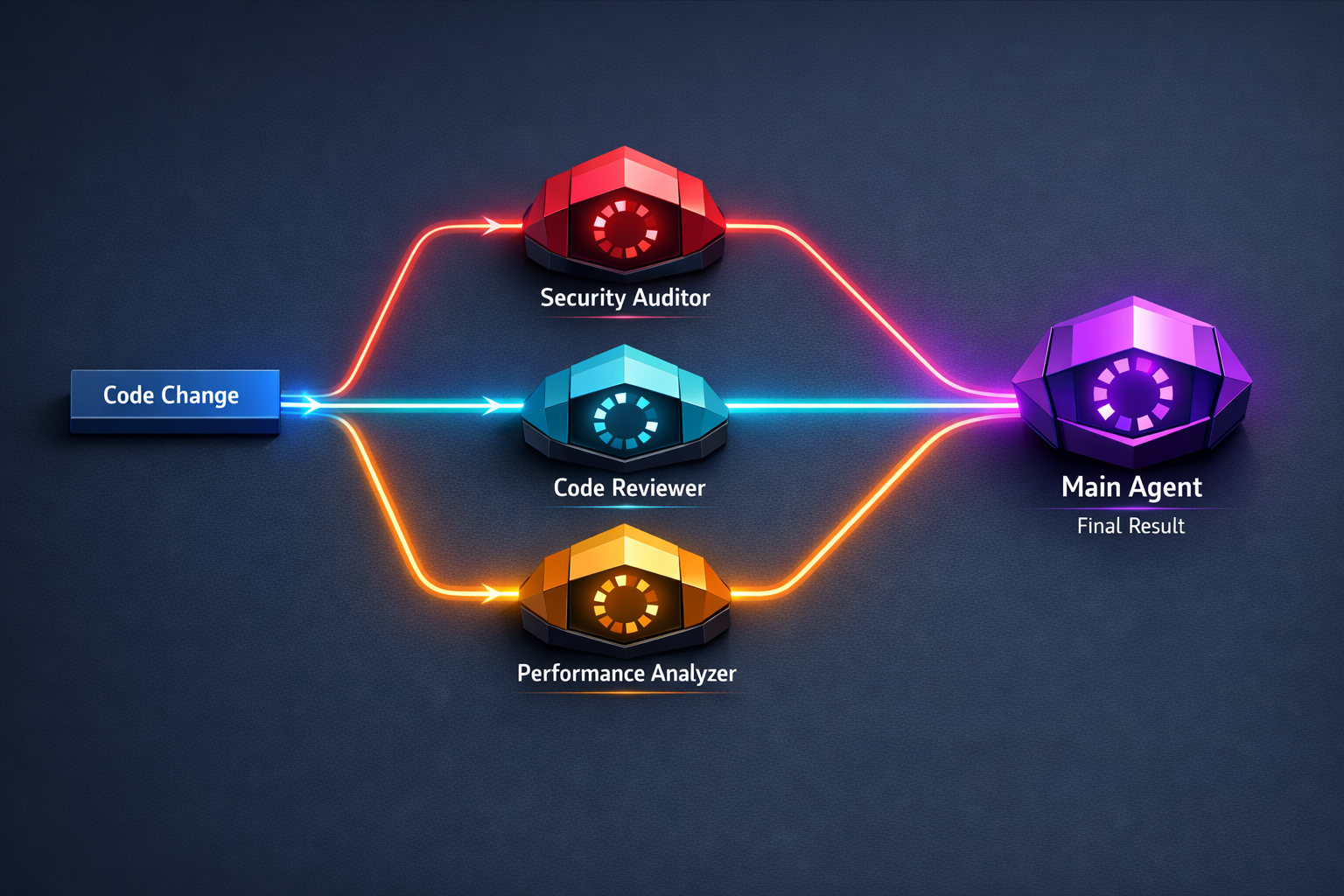
Multiple perspectives on the same change, combined into comprehensive feedback.
The flow is straightforward: Implementer → Reviewer → Implementer (fixes) → Reviewer (verify) → Done. Back-and-forth between agents until quality criteria are met.
Back-and-forth between agents until quality criteria are met.
Each subagent execution receives an agentId. You can resume a subagent later:
/resume agent-abc123This maintains the agent's context across sessions—useful for long-running research or multi-session projects.
Subagents solve several problems:
The description determines when Claude invokes the agent:
# Good - specific triggers
description: Security vulnerability analysis. Use when reviewing code that handles user input, authentication, or sensitive data.

# Bad - vague
description: Helps with security stuff.Reviewers shouldn't modify code. Analyzers shouldn't execute commands:
# Review agent - read only
tools: Read, Grep, Glob

# Implementation agent - full access
tools: Read, Write, Edit, Bash, Glob, GrepDon't use Opus for simple searches. Don't use Haiku for architecture decisions:
# Fast search
model: haiku

# Deep analysis
model: opus

# General implementation
model: sonnetStart with explicit invocation before enabling auto-invocation:
Subagents handle complex delegation. But sometimes you need reusable behaviors without full agent context—that's where skills and slash commands come in.
Up next: Part 5: Skills & Slash Commands — Create reusable capabilities that Claude auto-activates and commands you invoke explicitly.
Discover more content:
